Building Pac-Man’s Rival
Lecture W1R1: From CS 152 to GDScript
August 27, 2026
Insert Coin
Why be a total copycat?
Tuesday you sketched Pac-Man’s scene tree. Over the last 48 hours, the project got more ambitious.
- We are not going to spend a semester cloning a 45-year-old game. Starting today, this project becomes something nobody has built before.
- In comes BLITZ - our mighty Bearcat.
- The mazes? Campus buildings, one floor at a time - clear every floor to move on. No “levels”, no “stages”: our game has a campus. Ford Hall is first.
- The pellets? Marionberries. We live in Marion County; the berry is named for it. Figs are the rare power-up.
Welcome to Pac-Blitz.
And Blitz grows
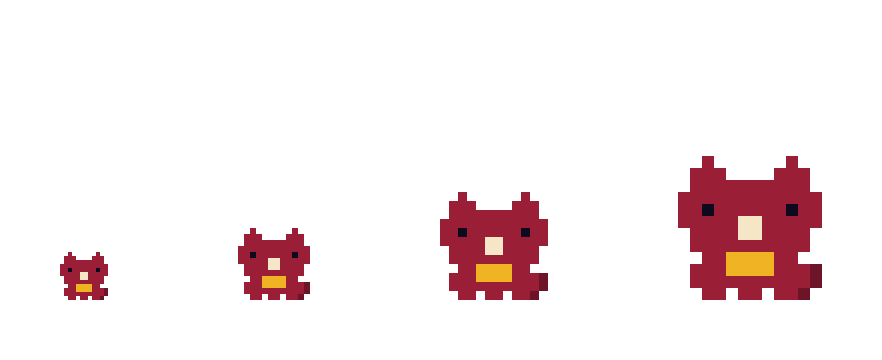
- First-Year: tiny, quick, slips through crawlspaces the big kids cannot.
- Sophomore: the growth spurt. The crawlspaces are a squeeze now - choose your routes.
- Junior: every marionberry feeds you. Bigger, stronger - and now they notice you.
- Senior: too big for the shortcuts and not as nimble. Find the exit. Graduate.
The twist is the future lesson plan
| Blitz mechanic | Course topic | Week |
|---|---|---|
| Who can fit through which gap | Collision layers & masks | Next week |
| Berry eaten → HUD updates | Signals | 3 |
| First-Year → Sophomore → Junior → Senior | State machines | 4-5 |
| Growth thresholds, berry values | Data-driven design | 6 |
| Buildings and floors as the map | Level building | 10 |
Every lecture from here on upgrades this game. By the showcase, Pac-Blitz will be a complete original game - and you will have watched every system get built.
Today’s agenda
LECTURE W1R1 // BUILDING PAC-BLITZ
Tuesday you drew the tree. Today we make it real, and learn GDScript on the way:
- Finish and debrief your scene trees - they are Blitz’s trees now.
- Build 1: Blitz moves. (variables, typing, if/elif, delta)
- Build 2: Blitz faces the direction of travel. (match)
- Build 3: marionberries Blitz can eat. (loops, instancing in code, a first signal)
- Boss fight: something wanders in. (arrays, randomness)
Your toolbox
Before you sketch: the menu you are ordering from. One node, one job.
| It should… | Reach for | Pac-Blitz example |
|---|---|---|
| Move and hit things | CharacterBody2D | Blitz, whatever chases Blitz |
| Just notice overlap | Area2D | Marionberries, figs |
| Draw an image | Sprite2D | Every visible thing |
| Draw text | Label | Berry count, “READY!” |
| Be a wall grid | TileMapLayer | A building floor |
| Play a sound | AudioStreamPlayer | Chomp |
| Count down | Timer | Enemy decisions |
| Float above the game | CanvasLayer | The HUD |
The decision rule: does it move? Body. Does it sense? Area. Does it show? Sprite or Label. This slide stays one keypress away while you work.
Finish your trees
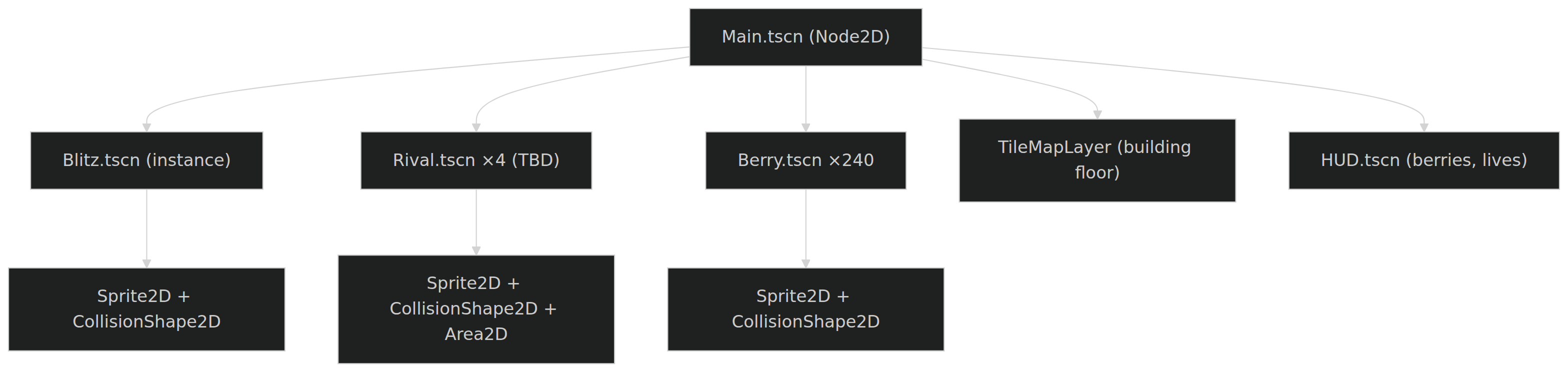
Back to Tuesday’s pairs. 3 minutes: finish your scene tree - and sketch it as Blitz’s game now. Decide:
- What scenes exist? What nodes are inside each?
- What gets instanced many times?
A solution sketch
A solution, not the solution. What matters: one scene per kind of thing, node choice is a design statement (movers are CharacterBody2D, overlap-detectors are Area2D), and the berry is authored once, instanced 240 times.
Today’s scope
We are building the first slice, and cutting like pros:
| Today | Punted (deliberately) |
|---|---|
| Blitz moves and faces | Walls and real collision |
| Marionberries vanish, count climbs | Berry count on screen |
| A placeholder ghost wanders | Enemy brains (chase!) |
| Blitz’s growth stages | |
| The actual building |
Scoping is a design skill. Everything in the right column has a scheduled week - the cut list is the future lesson plan.
Follow along
Clone the starter - it has the sprite pack and an empty Main scene, so you can build everything else with me:
Open project.godot in Godot. Run it: an empty dark window is correct - that is the void we fill today.
Stuck, behind, or curious? My finished version of every checkpoint for today lives in the reference repo: github.com/LucasCordova/pac-blitz (branches Build1-Build3 + main).
Build 1: Blitz Moves
Step 1: The Blitz scene
Exactly the tree you sketched. Build it with me:
- Scene → New Scene. In the empty Scene dock, click Other Node and pick
CharacterBody2D- Blitz moves, so Blitz is a body. - Double-click the new node’s name and rename it
Blitz.
See the yellow warning triangle next to the node? Godot is complaining that a physics body has no shape. It is right, and we will feed it in two steps. Nodes tell you what they need.
Step 2: A face and a shape
With Blitz selected, press Ctrl+A (Cmd+A on Mac) to add a child node:
- Add a
Sprite2D. In the Inspector its Texture slot says<empty>: dragassets/blitz.pngfrom the FileSystem dock (bottom left) onto that slot. Blitz appears in the viewport. - Click
Blitzagain (children attach to whatever is selected!), Ctrl+A / Cmd+A, add aCollisionShape2D. In the Inspector: Shape → New CircleShape2D, then drag the circle’s orange handles until it roughly covers Blitz. - The warning triangle is gone. Ctrl+S / Cmd+S, save as
blitz.tscn.
First scene: done. But do not press Run yet - there is a trap ahead.
Step 3: Put Blitz in the world
This is the step everyone misses. Run (F5, or Cmd+B on Mac) launches the project’s main scene - and our main.tscn is still an empty Node2D. Blitz exists; nobody invited him in.
- Open
main.tscn: double-click it in the FileSystem dock. - Select the
Mainroot, then click the chain-link icon at the top of the Scene dock (“Instantiate Child Scene” - Ctrl+Shift+A / Cmd+Shift+A) and chooseblitz.tscn. - Blitz lands at
(0, 0)- the top-left corner, half off screen. Drag him to the middle, or set Transform → Position to about(576, 324)in the Inspector. - Save, then run the project: F5 (Cmd+B on Mac).
Blitz stands in the void, majestic and inert. Time for GDScript.
Your first GDScript variables
Back in blitz.tscn: right-click the Blitz root → Attach Script. Godot pre-fills extends CharacterBody2D - it already knows what your script is-a. Keep the path res://blitz.gd, click Create. (There is also a scroll-with-a-green-plus button at the far right of the Scene dock’s toolbar, past the filter box - it only appears while a scriptless node is selected. Right-click never hides.)
Now type this below the extends line:
vardeclares, like the languages you know;: floatis optional static typing. Use it. Typed code autocompletes better and fails louder.:=infers the type from the value (you will meet it in a minute).@exporthoists the variable into the Inspector: tune without touching code.extendsnames the class this script is. Your script literally is-aCharacterBody2D.
Reading the keyboard
func _process(delta: float) -> void:
    var direction := Vector2.ZERO
    if Input.is_action_pressed("ui_left"):
        direction = Vector2.LEFT
    elif Input.is_action_pressed("ui_right"):
        direction = Vector2.RIGHT
    elif Input.is_action_pressed("ui_up"):
        direction = Vector2.UP
    elif Input.is_action_pressed("ui_down"):
direction = Vector2.DOWN- Functions are
func, blocks are indentation (Python students smile, Java students adjust). - Vector2 is the 2D type: position, direction, velocity - all Vector2.
Vector2.LEFTis(-1, 0). Inputis global;"ui_left"is a built-in action. Custom actions (“dash”, “chomp”): next week.
Making Blitz move
Two more lines close the loop:
Save the script (Ctrl+S / Cmd+S - unsaved code does not run), then run the project: F5 / Cmd+B. Arrow keys. Blitz moves. The first two minutes of every game you will ever write look exactly like this.
Experiment: delete * delta and run again. Speed now depends on frame rate - fast laptop, fast Blitz. delta (seconds since last frame) is what makes motion time-based, not frame-based. That is Tuesday’s Game Loop reading, live.
Nothing happened?
Every one of these is a rite of passage:
| Symptom | Cause and cure |
|---|---|
| Empty dark window | Blitz is not in main.tscn - back to Step 3. F5 runs the main scene, not the scene you are editing. |
| Wrong scene ran | F6 / Cmd+R runs the current scene; F5 / Cmd+B runs the project. Know which you pressed. |
| Keys “work” but Blitz is invisible | The Sprite2D has no texture - drag blitz.png onto it. |
| Blitz hides in the corner | He is at (0, 0). Drag him to the middle of Main and save. |
| Code edited, behavior unchanged | The script is not saved. Ctrl+S / Cmd+S, run again. |
Debugging checklist, forever: which scene ran, is the node in it, is the script saved?
Checkpoint: Build 1
You just used: extends, typed var, @export, func, if/elif, Vector2, delta, and a method call with a return value. That is half of GDScript’s daily vocabulary, and it took one moving bearcat.
In the class repo, this moment is git checkout Build1.
Build 2: Face Your Food
The problem
Blitz slides around staring right the whole time. A bearcat should chomp in its direction of travel.
We need: “given a direction, set the sprite’s rotation and flip.” Four cases. We could if/elif it, but GDScript has something better for shape-of-the-value branching:
match
func _update_facing(direction: Vector2) -> void:
var sprite := $Sprite2D as Sprite2D
match direction:
Vector2.RIGHT:
sprite.flip_h = false
sprite.rotation_degrees = 0
Vector2.LEFT:
sprite.flip_h = true
sprite.rotation_degrees = 0
Vector2.UP:
sprite.flip_h = false
sprite.rotation_degrees = -90
Vector2.DOWN:
sprite.flip_h = false
sprite.rotation_degrees = 90Call it from _process when direction != Vector2.ZERO.
Two things worth noticing
$Sprite2Dis a node reference: “my child named Sprite2D.” The tree you sketched Tuesday is addressable from code.- Why
flip_hfor LEFT instead of rotating 180°? Predict, then try it.
30 seconds with your neighbor: what would rotation_degrees = 180 do to the sprite that flip_h = true does not?
Rotating 180° turns Blitz upside down. Flipping mirrors the sprite. Every 2D game with a walking character makes this exact choice. (Yes, a climbing Blitz tilts sideways for now. It is charming. It ships.)
Build 3: Marionberries
The berry scene
Same recipe, new root. Scene → New Scene, then:
- Root: Other Node →
Area2D, renamedBerry- it never moves; it only needs to notice overlap. - Children (Ctrl+A / Cmd+A, with
Berryselected): aSprite2D(dragassets/berry.pngonto Texture) and aCollisionShape2D(Shape → New CircleShape2D, cover the berry). - Attach a script: right-click
Berry→ Attach Script, pathres://berry.gd. Create. - Select the
Berryroot and open the Node dock - the tab next to the Inspector. Under Signals, double-clickbody_entered(body: Node2D), then click Connect. Godot writes_on_body_enteredinto the script for you. - Save as
berry.tscn.
A signal is a node announcing that something happened - a doorbell, not a phone call. body_entered rings whenever a physics body overlaps the Area2D. We subscribe to it. (Week 3 is entirely about this idea.)
The berry’s whole life
- The editor wired
body_entered→_on_body_enteredfor us; the connection lives in the scene, not the script. signal eatendeclares our own doorbell;emit()rings it. Who listens? Not the berry’s problem. That is the whole point.queue_free(): “remove me from the tree at the end of this frame.” Eaten.
Who places 240 berries by hand?
Nobody. Open main.tscn, right-click the Main root → Attach Script (res://main.gd):
extends Node2D
const BERRY := preload("res://berry.tscn")
var berries: int = 0
func _ready() -> void:
for i in range(12):
var berry := BERRY.instantiate()
berry.position = Vector2(120 + i * 80, 324)
berry.eaten.connect(_on_berry_eaten)
add_child(berry)
func _on_berry_eaten() -> void:
berries += 1
print("Marionberries: ", berries)The big idea in that loop
preloadloads the berry scene as a value;instantiate()stamps out a copy: everything you did in the editor Tuesday, from code.for i in range(12): your CS 152 loops, unchanged.berry.eaten.connect(...): Main subscribes to each berry’s doorbell. Berries never know the count exists.
Code can build the level. The editor and the script are two hands on the same scene tree.
Save everything and run (F5 / Cmd+B): chomp down the row, watch the marionberry count climb in the Output panel at the bottom of the editor. git checkout Build3
Boss Fight: A Ghost?
A ghost that wanders
Every maze game needs pursuit. Pac-Blitz does not have its enemies yet - that is your design decision, coming up - so a placeholder ghost stands in. Same recipe, third verse: new scene, CharacterBody2D root named Ghost + Sprite2D (ghost.png) + CollisionShape2D, plus one new trick: a Timer child (Inspector: Wait Time 1, Autostart ON; connect its timeout signal in the Node dock - same ritual as the berry). Attach ghost.gd, save, then instance ghost.tscn into main.tscn (chain-link icon) and drop it at the far side of the room.
extends CharacterBody2D
const DIRECTIONS := [Vector2.LEFT, Vector2.RIGHT, Vector2.UP, Vector2.DOWN]
@export var speed: float = 160.0
var direction: Vector2 = Vector2.LEFT
func _process(delta: float) -> void:
    position += direction * speed * delta
    position = position.clamp(Vector2.ZERO, get_viewport_rect().size)
func _on_timer_timeout() -> void:
direction = DIRECTIONS.pick_random()Arrays and pick_random(): a one-line brain.
Run it… wait.
The ghost is eating our marionberries.
Why? Reread the berry’s code: _on_body_entered(body) fires for any physics body. The berry does not care who touched it - and we never told it to care.
Fixing this properly is called collision layers and masks, and it is exactly where next week begins. Until then: the ghost is hungry too.
Bugs that make sense are the best teachers. This one is a cliffhanger.
New Game+
Who chases Blitz?
It cannot be ghosts. My pitch: our actual rivals.
- The Northwest Conference: the Linfield Wildcat, the Pacific Boxer, the Puget Sound Logger, the George Fox Bruin, the Whitworth Pirate, the Whitman Blues, the PLU Lute, the Lewis & Clark Pioneer.
- Pac-Man’s four ghosts were famous for having four personalities: the chaser, the ambusher, the flanker, the wildcard.
- So: pick our four rivals - and give each one a personality. (Writing those brains is literally weeks 4-5: state machines.)
(Original pixel caricatures only - a wildcat, a logger, a pirate. School logos are trademarks; ours stay ours.)
Your homework is to have opinions
Between now and Tuesday, think about:
- Which four rivals chase Blitz - and what is each one’s personality? (Or out-pitch me with something better.)
- What does a fig do? Power-ups need design.
- Which building comes after Ford Hall?
Bring answers Tuesday. The best ones ship.
Game Over Screen
Take the game home
The best part: you already have it. Your follow-along copy is the game - keep building on it.
For comparison or catch-up, the reference repo holds my version of every checkpoint, one branch per build:
| Branch | State |
|---|---|
| Build1 | Movement |
| Build2 | Facing |
| Build3 | Marionberries + count |
| main | Everything + the placeholder ghost |
Diff your build against mine, break it, tune the @export speeds, add a second ghost. It cannot hurt you.
Optional: Godot can show git diffs and commits inside the editor via the official Godot Git Plugin - install steps are in the repo README. A terminal works just as well; use whichever you will actually use.
What you know now
- GDScript is your CS 152 brain with new punctuation: typed
var,func, if/elif,match,for, arrays. - The scene tree is addressable (
$Sprite2D) and buildable (preload+instantiate) from code. - Signals decouple: the berry announces, Main listens, neither knows the other’s job.
deltamakes motion time-based. Never ship without it.
Quest log
Lab 0: Press Start is due Tuesday, September 1, 9:59 PM via Canvas: Godot installed, Learn GDScript From Zero completed, your first scene pushed. After today, the scripting parts should feel familiar.
Reading for Tuesday (highly recommended): Game Programming Patterns, Game Loop and Update Method - you saw both run today.
Next time: the game loop up close: _process vs _physics_process, and what a frame really is.
References
Sources
- Godot Engine documentation, GDScript basics: docs.godotengine.org.
- Nystrom, R. Game Programming Patterns, Game Loop and Update Method: gameprogrammingpatterns.com.
- Class Pac-Blitz repos: pac-blitz-start (follow-along starter) and pac-blitz (reference; branches Build1-Build3 and main).