Advanced Query Techniques
DATA 503: Fundamentals of Data Engineering
April 8, 2026
Learning objectives
What you should be able to do
- Use scalar and derived-table subqueries for filtering and reshaping aggregates
- Choose
INvsEXISTS/NOT EXISTSfor membership tests and anti-joins - Write
LATERALjoins for per-row computations and top-N patterns - Refactor multi-step logic with CTEs (
WITH) and optionalCASEclassification
Course connection: These patterns show up in analytical SQL, incremental pipelines, and any time you need correct, readable transformations over relational data.
Restore the practice database
Create a Database
Create a database called class_dbs using the createdb command in a terminal OR using any method you usually use to create a new database.
Download the files from Canvas
You will get one of these (not both required):
| File | Format | Tool |
|---|---|---|
class_dbs.sql |
Plain SQL script | psql with -f |
class_dbs.dump |
Custom pg_dump -Fc archive |
pg_restore |
Save the file somewhere easy to find. The examples below assume it landed in your Downloads folder.
💻 Local PostgreSQL: plain SQL (psql)
Open a terminal, go to the folder that contains class_dbs.sql, then run psql against the class_dbs database you created above.
💻 Local PostgreSQL: custom archive (pg_restore)
The class_dbs database must exist before restore (same as the SQL path above).
🌐 Railway: same files, database railway
Replace host and port with the values from your Railway Postgres service (Variables / Connect). The database name is often railway.
Plain SQL:
Custom dump:
Subqueries: WHERE and FROM
Scalar subquery in WHERE
A scalar subquery returns one value. The database can evaluate it once, then use it like a constant in the outer query.
Run this. Counties at or above the national 90th percentile for pop_est_2019:
This subquery is uncorrelated: it does not reference the outer row. It typically runs once, then the outer query filters.
Derived table in FROM
A subquery in FROM builds a derived table. PostgreSQL requires an alias (AS ...).
Use this when you need to aggregate first, then treat the result as a table you can select from or join.
Checkpoint: above-average counties
Task: Return every county whose pop_est_2019 is strictly greater than the national average.
Required columns: county_name, state_name, pop_est_2019
Requirements:
- Use a scalar subquery in
WHEREthat computesavg(pop_est_2019)over all counties - Order by
pop_est_2019descending
Expected shape (first rows, illustrative):
| county_name | state_name | pop_est_2019 |
|---|---|---|
| Los Angeles County | California | 10039107 |
| Cook County | Illinois | 5150233 |
| Harris County | Texas | 4713320 |
Hint: Compare pop_est_2019 to (SELECT avg(pop_est_2019) FROM us_counties_pop_est_2019).
Solution: above-average counties
Why fewer than half the rows?
IN and EXISTS
IN (subquery)
IN tests membership against the set returned by the subquery.
Readable when the subquery is small and uncorrelated.
EXISTS and NOT EXISTS
EXISTS returns true if the subquery returns at least one row. The subquery can reference outer columns; that makes it correlated (conceptually: evaluated per outer row, though the planner may rewrite).
NOT EXISTS is the usual pattern for anti-joins: rows in A with no match in B. Prefer NOT EXISTS over NOT IN when the subquery can produce NULLs, because NOT IN with NULLs in the list behaves badly.
Checkpoint: active employees
Task: List employees who are not in retirees.
Required columns: first_name, last_name
Requirements: Use NOT EXISTS with a correlated subquery matching retirees.id to employees.emp_id. Order by last_name, first_name
Expected shape:
| first_name | last_name |
|---|---|
| Samuel | Cole |
| Arthur | Pappas |
| … | … |
Hint: SELECT 1 inside EXISTS is enough; you only care whether a row appears.
Solution: active employees
LATERAL joins
Top-N per group
LATERAL lets a subquery in FROM reference columns from earlier tables. Classic use: for each parent row, run a query and keep a few rows.
For each teacher, return their two most recent lab accesses.
LEFT JOIN LATERAL keeps teachers with zero visits (NULLs in a.*). ON true satisfies join syntax; filtering is inside the lateral subquery.
Checkpoint: one visit per teacher
Task: Same as the demo, but return only each teacher’s single most recent lab access.
Required columns:
first_namelast_nameaccess_timelab_name
Requirements:
LEFT JOIN LATERALwithORDER BY access_time DESCandLIMIT 1
Expected shape (illustrative):
| first_name | last_name | access_time | lab_name |
|---|---|---|---|
| Janet | Smith | 2022-12-21 … | Chemistry A |
| Lee | Reynolds | … | … |
Hint: Change one number from the demo query.
Solution: one visit per teacher
Review: Common Table Expressions (WITH)
Why CTEs
A CTE names an intermediate result. Use them when you:
- chain several logical steps
- reuse the same expression instead of repeating a subquery
- want readers (including future you) to follow the story top to bottom
Checkpoint: state totals with two CTEs
Task: Build a state-level summary (table: us_counties_pop_est_2019)
Required columns:
state_nametotal_pop(sum ofpop_est_2019)num_counties(count of rows per state)avg_pop_per_county(total_pop/num_counties, rounded to whole numbers is fine)
Requirements:
- CTE 1: aggregate population by
state_name - CTE 2: aggregate county counts by
state_name - Join the two CTEs on
state_name - Order by
avg_pop_per_countydescending
Expected shape (first rows):
| state_name | total_pop | num_counties | avg_pop_per_county |
|---|---|---|---|
| California | … | … | … |
| Texas | … | … | … |
Hint: Same GROUP BY state_name in both CTEs; join keys match exactly.
Solution: state totals with two CTEs
WITH state_pop AS (
    SELECT state_name, sum(pop_est_2019) AS total_pop
    FROM us_counties_pop_est_2019
    GROUP BY state_name
),
state_counties AS (
    SELECT state_name, count(*) AS num_counties
    FROM us_counties_pop_est_2019
    GROUP BY state_name
)
SELECT sp.state_name,
       sp.total_pop,
       sc.num_counties,
       round(sp.total_pop::numeric / sc.num_counties, 0) AS avg_pop_per_county
FROM state_pop AS sp
JOIN state_counties AS sc USING (state_name)
ORDER BY avg_pop_per_county DESC;
Crosstab
Enable and pivot
Reporting often needs long to wide layout. PostgreSQL provides crosstab() in the tablefunc extension.
CREATE EXTENSION IF NOT EXISTS tablefunc;

SELECT *
FROM crosstab(
    $$
    SELECT office, flavor, count(*) AS response_count
    FROM ice_cream_survey
    GROUP BY office, flavor
    ORDER BY office
    $$,
    $$ SELECT flavor
       FROM ice_cream_survey
       GROUP BY flavor
       ORDER BY flavor
    $$
) AS ct(
    office text,
    chocolate bigint,
    strawberry bigint,
    vanilla bigint
);
Contract: the first query must expose three columns: row id, category, value. The second query lists category labels. The outer AS (...) names output columns in that order.
CASE and classification
Pattern
CASE evaluates first match wins. Put the most specific conditions first when ranges overlap.
Checkpoint: population tiers with a CTE
Task: Classify each county, then summarize. (table: us_counties_pop_est_2019)
Required columns (final result):
tiernum_countiestotal_popavg_county_pop
Requirements:
- Use a CTE that adds
tierwithCASE - Outer query:
GROUP BY tierwith aggregates
Tier rules on pop_est_2019:
Metro:>= 500000Urban:100000to499999Suburban:50000to99999Rural: below50000
Expected shape:
| tier | num_counties | total_pop | avg_county_pop |
|---|---|---|---|
| Rural | … | … | … |
| Metro | … | … | … |
Hint: CASE should mirror the order above so a county falls into exactly one tier.
Solution: population tiers
WITH county_tiers AS (
    SELECT county_name,
           state_name,
           pop_est_2019,
           CASE
               WHEN pop_est_2019 >= 500000 THEN 'Metro'
               WHEN pop_est_2019 >= 100000 THEN 'Urban'
               WHEN pop_est_2019 >= 50000 THEN 'Suburban'
               ELSE 'Rural'
           END AS tier
    FROM us_counties_pop_est_2019
)
SELECT tier,
       count(*) AS num_counties,
       sum(pop_est_2019) AS total_pop,
       round(avg(pop_est_2019), 0) AS avg_county_pop
FROM county_tiers
GROUP BY tier
ORDER BY total_pop DESC;
Typical story: many counties are rural, but a small number of metro counties hold a large share of total population.
Summary
Techniques in one place
| Technique | Use it when |
|---|---|
Scalar subquery in WHERE |
Compare rows to one computed threshold |
Derived table in FROM |
Aggregate, then select or join the aggregate |
IN |
Simple membership against a set |
EXISTS / NOT EXISTS |
Correlated checks; anti-joins; nullable-safe negation |
LATERAL |
Per-row subquery, top-N per group |
CTE (WITH) |
Multiple named steps, less repetition |
crosstab() |
Pivot reporting shapes |
CASE |
Bucket values before or during aggregation |
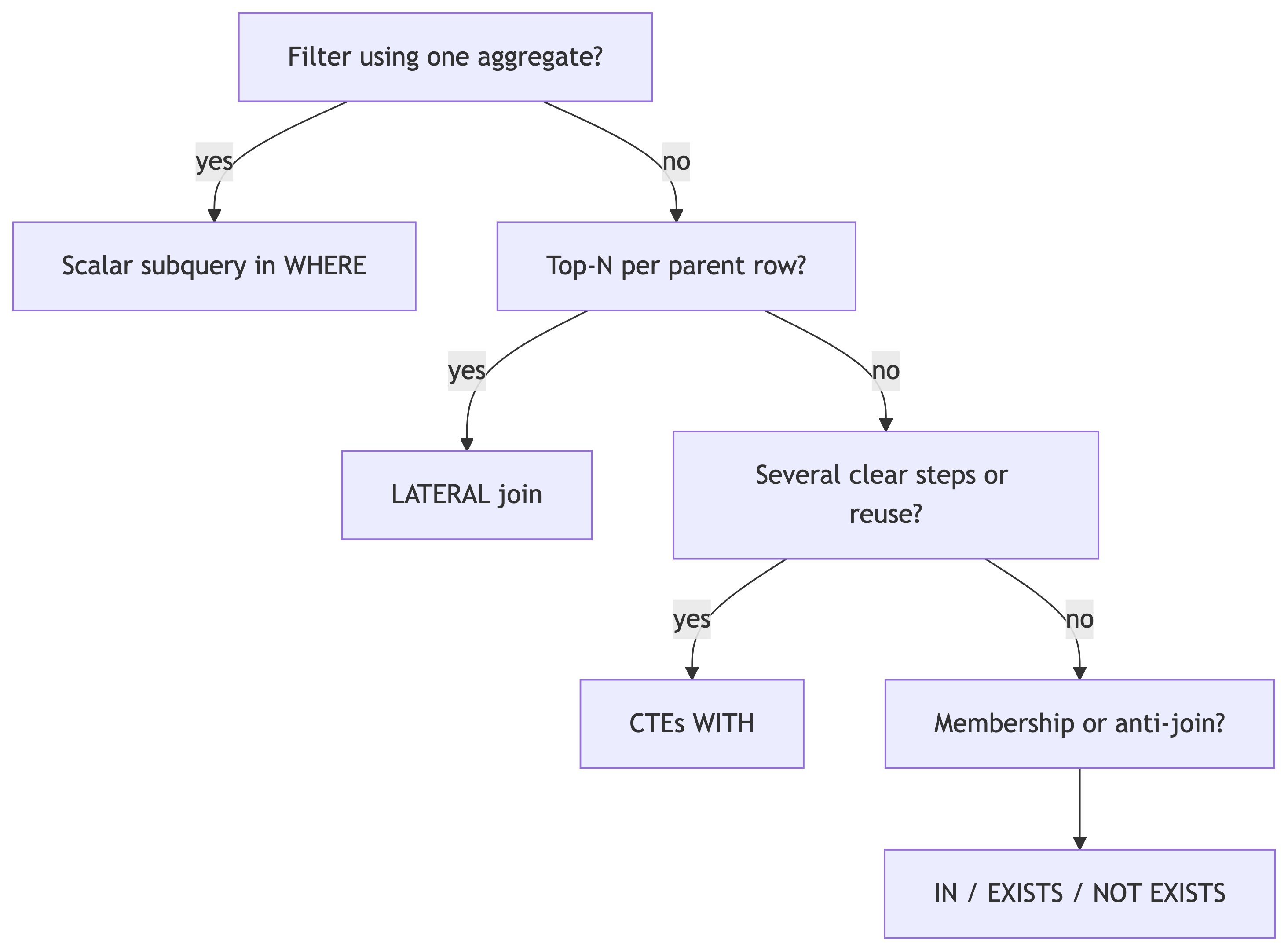
Choosing a pattern
References
- DeBarros, A. (2022). Practical SQL (2nd ed.). No Starch Press. Chapter 13.
- PostgreSQL: WITH Queries (CTEs)
- PostgreSQL: Subquery Expressions
- PostgreSQL: LATERAL
- PostgreSQL: tablefunc