DATA 503: Fundamentals of Data Engineering
April 6, 2026
\d, {n,m}, groups, alternation) and use ~, ~*, !~, and substring(... from ...)regexp_match, regexp_matches, regexp_replace, and regexp_split_to_table to transform texttsvector and tsquery represent, use to_tsvector and to_tsquery (and when plainto_tsquery helps), and filter with @@ plus a GIN indexts_headline for snippets and ts_rank for ordering matches (including length normalization)Text is not a luxury column type. It is where half your “CSV from a government website” problems live. Today we give SQL something sharper than hope. 🙏
Create a dedicated database for this chapter using whatever method you prefer or the command above in a terminal.
Download and run the setup script mining_text.sql ↓ while connected to mining_text. The file embeds all rows with INSERT statements (dollar-quoted text), so you can run it from pgAdmin or Beekeeper without configuring server-side CSV paths.
You’re welcome. 😂
Optional: crime_reports.csv matches the embedded crime narratives if you want to practice client-side \copy from psql and compare it to the all-in-one script.
I won’t stop you! 😂
| Table | Source | Role |
|---|---|---|
county_regex_demo |
bundled in mining_text.sql |
Regex filtering practice (~, ~*) |
crime_reports |
embedded in mining_text.sql |
Parse semi-structured police narratives |
president_speeches |
embedded in mining_text.sql |
Full-text search on State of the Union addresses |
Run these after the setup script finishes to verify the counts of the tables.
JSON gets the hype. Arrays get the conference talks. Strings pay the rent: addresses, notes, log lines, pasted emails, and whatever your stakeholder calls “structured” because it has a colon somewhere.
PostgreSQL’s string toolkit is documented in the manual under String Functions. We start with the ones you will actually type.
Run these in order and watch how forgiving real-world text is not.
initcap capitalizes word starts. It does not read minds. Your acronym table lives in application code, not here.
SELECT char_length(' Pat ');
SELECT length(' Pat ');          -- same for varchar; byte length differs on some types
SELECT position(', ' in 'Tan, Bella');
SELECT trim('s' from 'socks');
SELECT trim(trailing 's' from 'socks');
SELECT trim(' Pat ');
SELECT char_length(trim(' Pat '));
SELECT ltrim('socks', 's');
SELECT rtrim('socks', 's');Run these in order.
SELECT char_length(' Pat ');
-- 5
SELECT length(' Pat ');          -- same for varchar; byte length differs on some types
-- 5
SELECT position(', ' in 'Tan, Bella');
-- 4
SELECT trim('s' from 'socks');
-- ock
SELECT trim(trailing 's' from 'socks');
-- sock
SELECT trim(' Pat ');
-- Pat
SELECT char_length(trim(' Pat '));
-- 3
SELECT ltrim('socks', 's');
-- ocks
SELECT rtrim('socks', 's');
-- sock
If you are counting characters for validation rules, char_length after trim is the boring, correct path.
Run these (including the replace('aaa', ...) check).
Quick check: replace('aaa', 'aa', 'b') returns ba (left-to-right, non-overlapping substitution). String replacement is greedy in a way that will eventually humble everyone.
A regular expression (regex) is a small pattern language for describing text shape. You hand PostgreSQL a pattern string; the engine can test a match, return the matched substring, split on delimiters, or pull out captured pieces.
PostgreSQL uses POSIX regular expressions (documented under Pattern Matching). In SQL the pattern usually lives in a single-quoted string. Backslashes are easy to get wrong: the string parser and the regex engine both care about \, so you often write '\\d' (two characters in source, one backslash in the pattern) or use dollar-quoting when patterns get busy.
| Piece | Meaning |
|---|---|
. |
one character (with caveats: not always newline) |
\d |
a digit 0–9 |
\w |
a word character (letters, digits, underscore in the POSIX class) |
[0-9] |
any single digit from the list |
{n} |
repeat the previous “atom” exactly n times |
{n,m} |
repeat at least n and at most m times, so {1,2} means one or two |
+ |
one or more; * zero or more; ? optional (zero or one) |
^ $ |
start and end of the string (for these lectures, think whole-field matching unless noted) |
\| |
alternation: A\|B is A or B |
() |
grouping; also capture for regexp_match |
(?: … ) |
group without capturing (still useful for precedence) |
\d{1,2}/\d{1,2}/\d{2} describes a date fragment like 4/16/17: one or two digits, slash, one or two digits, slash, two digits. Slashes are literal here; we sometimes escape them as \/ in patterns for clarity or habit from other tools.
| Operator | Meaning |
|---|---|
~ |
matches, case sensitive |
~* |
matches, case insensitive |
!~ |
does not match, case sensitive |
!~* |
does not match, case insensitive |
In WHERE clauses, regex turns a pile of LIKE patterns into one expressive filter. It also turns a simple bug into a performance mystery. Use indexes thoughtfully (later: GIN for FTS; for regex alone, sometimes a functional index, sometimes a redesign).
SELECT substring('The game starts at 7 p.m. on May 2, 2024.' from '.+');
SELECT substring('The game starts at 7 p.m. on May 2, 2024.' from '\d{1,2} (?:a.m.|p.m.)');
SELECT substring('The game starts at 7 p.m. on May 2, 2024.' from '^\w+');
SELECT substring('The game starts at 7 p.m. on May 2, 2024.' from '\w+.$');
SELECT substring('The game starts at 7 p.m. on May 2, 2024.' from 'May|June');
SELECT substring('The game starts at 7 p.m. on May 2, 2024.' from '\d{4}');
SELECT substring('The game starts at 7 p.m. on May 2, 2024.' from 'May \d, \d{4}');substring(string from pattern) returns the first match. Run them one at a time.
SELECT substring('The game starts at 7 p.m. on May 2, 2024.' from '.+');
-- The game starts at 7 p.m. on May 2, 2024.
SELECT substring('The game starts at 7 p.m. on May 2, 2024.' from '\d{1,2} (?:a.m.|p.m.)');
-- 7 p.m.
SELECT substring('The game starts at 7 p.m. on May 2, 2024.' from '^\w+');
-- The
SELECT substring('The game starts at 7 p.m. on May 2, 2024.' from '\w+.$');
-- 2024.
SELECT substring('The game starts at 7 p.m. on May 2, 2024.' from 'May|June');
-- May
SELECT substring('The game starts at 7 p.m. on May 2, 2024.' from '\d{4}');
-- 2024
SELECT substring('The game starts at 7 p.m. on May 2, 2024.' from 'May \d, \d{4}');
-- May 2, 2024
Notice how greedy .+ is on the first pattern. Regex is a contract between you and the parser. Read the contract. 🤝
We use county_regex_demo instead of the full Census extract.
Run a SELECT * FROM county_regex_demo; to see the data. What would these queries return?
The second query is the classic “I want Ashland but not Washington” maneuver. If your data contains NULL county names, remember that WHERE col ~ 'pattern' does not match NULL.
Run these.
SELECT regexp_replace('05/12/2024', '\d{4}', '2023');
-- 05/12/2023
SELECT regexp_split_to_table('Four,score,and,seven,years,ago', ',');
-- Four
-- score
-- and
-- seven
-- years
-- ago
SELECT regexp_split_to_array('Phil Mike Tony Steve', ' ');
-- {Phil,Mike,Tony,Steve}
SELECT array_length(regexp_split_to_array('Phil Mike Tony Steve', ' '), 1);
-- 4
regexp_split_to_table is a set-returning function: it produces one row per piece. That makes it handy for normalizing multi-valued cells.”
Run a SELECT * FROM crime_reports; to see the data. What would this query return?
Our crime_reports table loads only original_text. Everything else (dates, address, offense, case number) is hiding inside the blob.
Run this to open one row:
Beautiful. Readable. Terrible for GROUP BY. We will fix that with patterns, not with interns.
Run this.
regexp_match returns the first match as a text array (or NULL).
Row 1 has two dates in the narrative.
regexp_matches with the g flag finds every non-overlapping match.
Compare the two outputs for rows that mention more than one calendar date.
Run these:
Parentheses in the pattern define capture groups. regexp_match still returns the whole match as element [1] when you wrap only part of the pattern. Run both.
SELECT crime_id,
       regexp_match(original_text, '-\d{1,2}\/\d{1,2}\/\d{2}')
FROM crime_reports
ORDER BY crime_id;
-- 1 | {-4/17/17}
-- 2 |
-- 3 |
-- 4 |
-- 5 |
SELECT crime_id,
       regexp_match(original_text, '-(\d{1,2}\/\d{1,2}\/\d{2})')
FROM crime_reports
ORDER BY crime_id;
-- 1 | {4/17/17}
-- 2 |
-- 3 |
-- 4 |
-- 5 |
The second version drops the leading hyphen by capturing only the date digits.
Run this:
SELECT
    crime_id,
    regexp_match(original_text, '(?:C0|SO)[0-9]+') AS case_number,
    regexp_match(original_text, '\d{1,2}\/\d{1,2}\/\d{2}') AS date_1,
    regexp_match(original_text, '\n(?:\w+ \w+|\w+)\n(.*):') AS crime_type,
    regexp_match(original_text, '(?:Sq.|Plz.|Dr.|Ter.|Rd.)\n(\w+ \w+|\w+)\n')
        AS city
FROM crime_reports
ORDER BY crime_id;This is not pretty, but it is honest.
SELECT
    crime_id,
    regexp_match(original_text, '(?:C0|SO)[0-9]+') AS case_number,
    regexp_match(original_text, '\d{1,2}\/\d{1,2}\/\d{2}') AS date_1,
    regexp_match(original_text, '\n(?:\w+ \w+|\w+)\n(.*):') AS crime_type,
    regexp_match(original_text, '(?:Sq.|Plz.|Dr.|Ter.|Rd.)\n(\w+ \w+|\w+)\n')
        AS city
FROM crime_reports
ORDER BY crime_id;
-- 1 | {C0170006614} | {4/16/17} | {Larceny} | {Sterling}
-- 2 | {C0170006162} | {4/8/17} | {Destruction of Property} | {Sterling}
-- 3 | {C0170006079} | {4/4/17} | {Larceny} | {Sterling}
-- 4 | {SO170006250} | {04/10/17} | {Larceny} | {Middleburg}
-- 5 | {SO170006211} | {04/09/17} | {Destruction of Property} | {Sterling}
Patterns like this are why we version-control SQL. The day the sheriff’s office changes a label from hrs. to hours, you will discover the true meaning of “breaking change.”
[1]Run this:
regexp_match returns text[]. Grab the first element explicitly.
If the match fails, regexp_match is NULL and [1] is NULL. Plan for that when you cast to timestamps.
The textbook walks through UPDATE statements that cast extracted dates to timestamptz and fill street, city, crime_type, and description. The expressions are long but repetitive: once you trust one regexp_match, the rest are the same idea with different patterns.
Question for you: Why might EXISTS (SELECT regexp_matches(...)) appear in a CASE branch?
Because sometimes you need to know whether a second date exists before you try to parse it.
date_1 Once⚠️Don’t run this (unless you are using a scratch database or copy of the crime_reports table):
CREATE temp TABLE crime_reports_copy AS SELECT * FROM crime_reports; -- ⬅︎ Do this first!

UPDATE crime_reports
SET date_1 =
(
    (regexp_match(original_text, '\d{1,2}\/\d{1,2}\/\d{2}'))[1]
        || ' ' ||
    (regexp_match(original_text, '\/\d{2}\n(\d{4})'))[1]
        || ' US/Eastern'
)::timestamptz
RETURNING crime_id, date_1, original_text; -- ⬅︎ WT is this?date_1 · OutputThe book examples concatenate dates with MM/DD/YY form with the first time field (four digits) and a time zone.
Run once (it updates every row). Use a scratch database or ROLLBACK if you are experimenting.
UPDATE crime_reports_copy -- ⬅︎ This is the copy... whew!
SET date_1 =
(
    (regexp_match(original_text, '\d{1,2}\/\d{1,2}\/\d{2}'))[1]
        || ' ' ||
    (regexp_match(original_text, '\/\d{2}\n(\d{4})'))[1]
        || ' US/Eastern'
)::timestamptz
RETURNING crime_id, date_1, original_text; -- ⬅︎ WT is this still?
-- 1 | 2017-04-17 01:00:00+00 | ...
-- 2 | 2017-04-08 20:00:00+00 | ...
-- 3 | 2017-04-04 18:00:00+00 | ...
-- 4 | 2017-04-10 20:05:00+00 | ...
-- 5 | 2017-04-09 16:00:00+00 | ...RETURNING?RETURNING shows you what you broke before you commit. This is not Tinder. Do not swipe right on untested regex.
If a row lacks one of the pieces, the corresponding regexp_match is NULL and the concatenation collapses in ways PostgreSQL will explain loudly. That is good. Silent failure is how you become a historian instead of a data engineer.
Run this:
After a full UPDATE of all parsed columns (as in the book), a simple report query becomes possible. The UPDATE sets date_1 only (other parsed columns stay NULL until you run the full UPDATE block that sets all parsed columns).
Compare mentally to the blob you started with. That difference is the whole lecture in one SELECT.
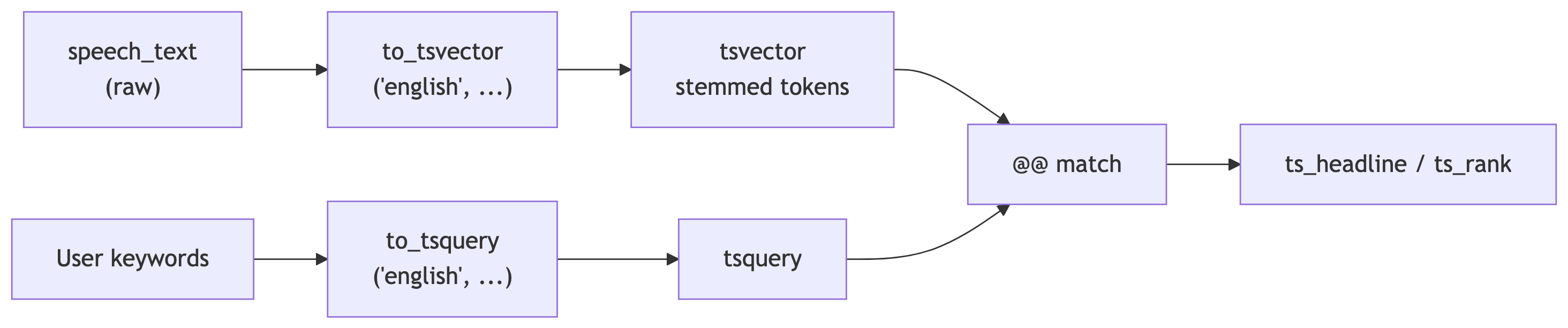
Raw text becomes a tsvector via to_tsvector. User or application text becomes a tsquery via to_tsquery (or helpers such as plainto_tsquery). The @@ operator tests whether a document matches a query. ts_headline and ts_rank sit after that: snippets and sort order for the matching rows. The GIN index sits on the stored tsvector so @@ does not devolve into a sequential scan over every speech.
pg_ts_configRun this:
pg_ts_config · OutputFull-text search is not LIKE '%tax%'. It tokenizes, stems, drops noise words, and gives you operators that behave well at scale.
Check which language configurations exist.
tsvector and tsqueryPostgreSQL full-text search works with two structured types, not raw text alone.
A tsvector is the document side: a normalized list of lexemes (stemmed tokens), usually with positions (and optional weights). It answers “what searchable terms does this row contain, and where?”
A tsquery is the query side: lexemes plus boolean and proximity operators. It answers “what pattern of terms are we looking for?”
You convert text into each form with functions (to_tsvector, to_tsquery, and related helpers). The match operator @@ compares a tsvector to a tsquery and returns true or false.
to_tsvector: from prose to a searchable documentto_tsvector('english', some_text) (first argument is a text search configuration name or regconfig) does the linguistic work on the document:
the, am, and similar)walking and walk can converge to the same lexeme)What it is for: producing the indexed, comparable form of a blob of text. In pipelines you often store a tsvector column (here search_speech_text) so you are not re-tokenizing on every search, and so a GIN index can target stable values.
tsquery: to_tsquery and related functionsYou need a tsquery on the right-hand side of @@. Common builders:
| Function | Role |
|---|---|
to_tsquery(config, string) |
Parses a search string you write. You insert operators yourself (&, |, !, <->, <N>). Powerful; best when your code builds the string. |
plainto_tsquery(config, string) |
Turns plain language into an AND of terms (after normalization). Handy for simple user-typed keywords without special syntax. |
phraseto_tsquery(config, string) |
Treats the string as a phrase (adjacent terms after tokenization). |
This lecture uses to_tsquery so you see operators explicitly. In an app you might combine plainto_tsquery or validated user input with server-side templates.
@@: the match predicatetsvector @@ tsquery returns boolean.
What it is for: the WHERE clause (and index conditions) that decides which rows participate in search. Everything else (ts_headline, ts_rank) is presentation or ordering on rows that already passed @@ (or on expressions you know match).
Typical pattern: WHERE search_speech_text @@ to_tsquery('english', 'vietnam').
to_tsvector, to_tsquery, and @@SELECT to_tsvector('english', 'I am walking across the sitting room to sit with you.');
SELECT to_tsquery('english', 'walking & sitting');
SELECT to_tsvector('english', 'I am walking across the sitting room')
@@ to_tsquery('english', 'walking & sitting');
SELECT to_tsvector('english', 'I am walking across the sitting room')
@@ to_tsquery('english', 'walking & running');Run these to see the stemmed lexemes, the parsed query, and the boolean match.
SELECT to_tsvector('english', 'I am walking across the sitting room to sit with you.');
-- 'across':4 'room':7 'sit':6,9 'walk':3

SELECT to_tsquery('english', 'walking & sitting');
-- 'walk' & 'sit'

SELECT to_tsvector('english', 'I am walking across the sitting room')
       @@ to_tsquery('english', 'walking & sitting');
-- t

SELECT to_tsvector('english', 'I am walking across the sitting room')
       @@ to_tsquery('english', 'walking & running');
-- f
Notice the document and query both pass through the same english config so stems line up (walking becomes walk in both worlds).
to_tsquery& AND| OR! NOT<-> adjacent terms (phrase)<N> distance (terms within N positions)We will lean on the State of the Union table. The setup script adds a tsvector column named search_speech_text. The next slides explain the GIN index that makes @@ queries scale.
GIN stands for Generalized Inverted Index.
An inverted index flips the problem: instead of “for each row, what words does it have?” it stores “for each lexeme (stemmed token), which rows point at it?” That is exactly what @@ needs when it asks whether a document tsvector matches a tsquery.
Each indexed value is a tsvector: a list of lexemes with optional position and weight data. PostgreSQL walks the query tokens, looks them up in the inverted structure, and intersects or combines posting lists to find candidate rows.
tsvector, not a B-tree on text?A B-tree is great for equality, range order, and prefix scans on a scalar column. It does not give you fast “contains these stemmed tokens anywhere in the document” semantics.
Full-text search matches on the precomputed tsvector column (search_speech_text), not on raw speech_text. You keep raw text for display; you match and rank on the vector. The GIN index is built on that vector column.
For tsvector, GIN is the usual default. GiST is an alternative with different update and recall trade-offs; for typical read-heavy search, GIN is the common choice.
Reads: Index-supported WHERE search_speech_text @@ to_tsquery(...) can use a bitmap index scan instead of reading every speech. That is the win you want in production.
Writes: Inserts and updates must maintain the inverted lists, so indexed columns cost more than an unindexed text column. Big bulk loads often finish the data, then build the index (or defer index creation until after load).
If you skip the index, search still returns correct results. The database just does a sequential scan and evaluates @@ per row. Fine for tiny tables; painful at scale.
USING gin tells PostgreSQL which access method to use. The indexed expression is the tsvector column, not a function of raw text (you already materialized the vector in search_speech_text).
After the index exists, a search like the next slide should show an index scan or bitmap index scan on search_idx in EXPLAIN (ANALYZE, BUFFERS) on a large enough table. If you see Seq Scan on president_speeches with only a handful of rows, the planner may still choose a sequential read, and that can be rational.
Without any GIN index on tsvector, expect sequential scans for @@ filters as the table grows.
Run this:
ts_headline: what it does and when to use itInputs: a text column to display (usually the original speech_text), a tsquery that describes the hit, and optional formatting options (how many words around the hit, delimiter strings for highlights).
What it does: picks a short excerpt that contains a good match and marks the matching terms (here with < and > around hits). It does not decide whether the row matches; use @@ in WHERE for that.
What it is for: search UIs (result snippets), email-style previews, and anywhere users need context without loading the full document. You still filter with search_speech_text @@ ... first; ts_headline is presentation layer on top.
Run this:
SELECT president,
       speech_date,
       ts_headline(
           speech_text,
           to_tsquery('english', 'tax'),
           'StartSel = <,
            StopSel = >,
            MinWords=5,
            MaxWords=7,
            MaxFragments=1'
       )
FROM president_speeches
WHERE search_speech_text @@ to_tsquery('english', 'tax')
ORDER BY speech_date;
-- Harry S. Truman | 1946-01-21 | ... <tax> POLICY ...
-- Harry S. Truman | 1947-01-06 | excise <tax> rates which, under the present
-- Harry S. Truman | 1948-01-07 | point in our <tax> structure. ...
-- ... (many more rows mention tax)That angle-bracket markup is for HTML consumers. In slides, it still reads clearly as “here is the hit in context.”
Run each query:
SELECT president,
       speech_date,
       ts_headline(
           speech_text,
           to_tsquery('english', 'transportation & !roads'),
           'StartSel = <, StopSel = >, MinWords=5, MaxWords=7, MaxFragments=1'
       )
FROM president_speeches
WHERE search_speech_text @@ to_tsquery('english', 'transportation & !roads')
ORDER BY speech_date;
SELECT president,
       speech_date,
       ts_headline(
           speech_text,
           to_tsquery('english', 'military <-> defense'),
           'StartSel = <, StopSel = >, MinWords=5, MaxWords=7, MaxFragments=1'
       )
FROM president_speeches
WHERE search_speech_text @@ to_tsquery('english', 'military <-> defense')
ORDER BY speech_date;SELECT president,
speech_date,
ts_headline(
speech_text,
to_tsquery('english', 'transportation & !roads'),
'StartSel = <, StopSel = >, MinWords=5, MaxWords=7, MaxFragments=1'
)
FROM president_speeches
WHERE search_speech_text @@ to_tsquery('english', 'transportation & !roads')
ORDER BY speech_date;
-- Harry S. Truman | 1947-01-06 | Mr. President, Mr. Speaker, Members
-- Harry S. Truman | 1949-01-05 | Mr. President, Mr. Speaker, Members
SELECT president,
speech_date,
ts_headline(
speech_text,
to_tsquery('english', 'military <-> defense'),
'StartSel = <, StopSel = >, MinWords=5, MaxWords=7, MaxFragments=1'
)
FROM president_speeches
WHERE search_speech_text @@ to_tsquery('english', 'military <-> defense')
ORDER BY speech_date;
-- Dwight D. Eisenhower | 1956-01-05 | To the Congress of the
-- Dwight D. Eisenhower | 1958-01-09 | Mr. President, Mr. Speaker, Members
-- Dwight D. Eisenhower | 1959-01-09 | Mr. President, Mr. Speaker, MembersTry <2> instead of <-> in a copy of the query to allow a small gap between words. Language is messy. PostgreSQL knows.
ts_rank: what it does and when to use itInputs: a tsvector (the indexed document form) and a tsquery.
What it does: assigns a numeric relevance score based on how often query terms appear in the document vector (and related weighting). Higher scores mean “more query overlap” in a loose sense.
What it is for: sorting result sets when many rows satisfy @@. It is not a calibrated probability or a user-facing “percent match”; treat it as a relative ordering signal within one query.
Optional normalization: ts_rank(vector, query, 2) uses a normalization mode that penalizes long documents so a twenty-page speech does not always outrank a short one just because it repeats words more often. Compare ordering with and without that flag on the next slide.
Run both and compare ordering.
SELECT president,
       speech_date,
       ts_rank(
           search_speech_text,
           to_tsquery('english', 'war & security & threat & enemy')
       ) AS score
FROM president_speeches
WHERE search_speech_text @@
      to_tsquery('english', 'war & security & threat & enemy')
ORDER BY score DESC
LIMIT 5;
SELECT president,
       speech_date,
       ts_rank(
           search_speech_text,
           to_tsquery('english', 'war & security & threat & enemy'),
           2
       )::numeric AS score
FROM president_speeches
WHERE search_speech_text @@
      to_tsquery('english', 'war & security & threat & enemy')
ORDER BY score DESC
LIMIT 5;SELECT president,
speech_date,
ts_rank(
search_speech_text,
to_tsquery('english', 'war & security & threat & enemy')
) AS score
FROM president_speeches
WHERE search_speech_text @@
to_tsquery('english', 'war & security & threat & enemy')
ORDER BY score DESC
LIMIT 5;
-- William J. Clinton | 1997-02-04 | 0.35810584
-- George W. Bush | 2004-01-20 | 0.29587495
-- George W. Bush | 2003-01-28 | 0.28381455
-- Harry S. Truman | 1946-01-21 | 0.25752166
-- William J. Clinton | 2000-01-27 | 0.22214262
SELECT president,
speech_date,
ts_rank(
search_speech_text,
to_tsquery('english', 'war & security & threat & enemy'),
2
)::numeric AS score
FROM president_speeches
WHERE search_speech_text @@
to_tsquery('english', 'war & security & threat & enemy')
ORDER BY score DESC
LIMIT 5;
-- George W. Bush | 2004-01-20 | 0.000103
-- William J. Clinton | 1997-02-04 | 0.000098
-- George W. Bush | 2003-01-28 | 0.000096
-- Jimmy Carter | 1979-01-23 | 0.000090
-- Lyndon B. Johnson | 1968-01-17 | 0.000073Long speeches accumulate token hits. Normalization option 2 divides rank by document length.
Compare the ordering before and after normalization. This is the difference between “mentions the keywords a lot” and “mentions them a lot relative to length.”
The book points to a live demo at anthonydebarros.com/sotu. Worth clicking after class.
Write a query that returns crime_id and the case number extracted from original_text using the same (?:C0|SO)[0-9]+ pattern, but filter to rows where the case starts with SO.
Stretch: Add a column that counts how many distinct dates appear in the narrative using regexp_matches with the g flag and a subquery or lateral trick. (If you get stuck, move on. The point is to think in matches, not to win a Nobel prize in SQL golf.)
Find speeches where the query economy & jobs matches, show ts_headline, and sort by normalized rank (ts_rank with the length divisor). Pick a president you have opinions about. Keep the opinions out of the query.
regexp_match returns NULL when nothing matches, then indexing [1] in a cast chainLIKE patterns with regex operators by mistake (they are not interchangeable)OR chains when a single well-factored regex would dotsvector columns and wondering why search “works on my laptop”| Topic | Core functions and ideas |
|---|---|
| Strings | upper, lower, initcap, trim, left/right, replace, char_length |
| Regex filters | ~, ~*, !~, substring, regexp_replace, splits |
| Structured extraction | regexp_match, regexp_matches, capture groups, [1] indexing |
| Full-text search | tsvector / tsquery types; to_tsvector, to_tsquery, plainto_tsquery; @@; ts_headline, ts_rank |
| Performance | GIN (inverted index on tsvector); favors search reads over cheap writes |
Treat text like data: measure it, constrain it, extract what you need, and index what you search. Everything else is a spreadsheet someone emailed you as prose.