
Dashboards with Grafana
DATA 503: Fundamentals of Data Engineering
April 6, 2026
Learning Objectives
What You Will Be Able to Do
- Explain where dashboards sit in a pipeline and why Grafana is a reasonable choice for SQL-backed analytics
- Read and reason about dashboard-oriented views (aggregations, joins, classifications)
- Interpret
crosstab()pivots fromtablefuncand know when a table panel in Grafana is the right visualization - Provision PostgreSQL 18 on Railway and restore a custom-format dump with
pg_restoreusing the public database URL - Deploy Grafana on Railway with a separate
grafanadatabase for persistence and connect it to pipeline data with a read-only role - Build several panel types (bar, horizontal bar, grouped bar, table) from named views and pivot queries
Course Connection
This ties ingestion and modeling work to stakeholder-facing delivery: live, shareable visuals over the same database your pipeline maintains.
Part 1: Dashboards in the Pipeline
The Presentation Layer
Dashboards are the presentation layer. They turn vetted SQL into charts and tables other people can read without learning JOIN syntax.
Where Grafana Sits
Grafana does not replace your ETL jobs. It reads from PostgreSQL (ideally through views and restricted users) and renders results on a schedule or on demand.
What Makes a Good Pipeline Dashboard?
- Live connection to the database, not a one-off CSV export
- Refresh so panels stay current as data lands
- Shareable links for reviews and demos
- Layered layout: headline metrics on top, comparisons in the middle, detail tables below
Part 2: Grafana Overview
What Grafana Is
Grafana is an open-source observability and dashboarding platform. It started in metrics and logs, but its PostgreSQL data source is mature: you write SQL, Grafana maps columns to charts.
Why Grafana for This Course?
- PostgreSQL-native data source with a SQL editor
- Many panel types: time series, bar, table, stat, pie, heatmap, and more
- Variables for filters (dropdowns that rewrite queries)
- Alerting when a query crosses a threshold
- Fits Railway: can run next to your database; serverless mode reduces idle cost
Grafana Architecture (Two Databases)
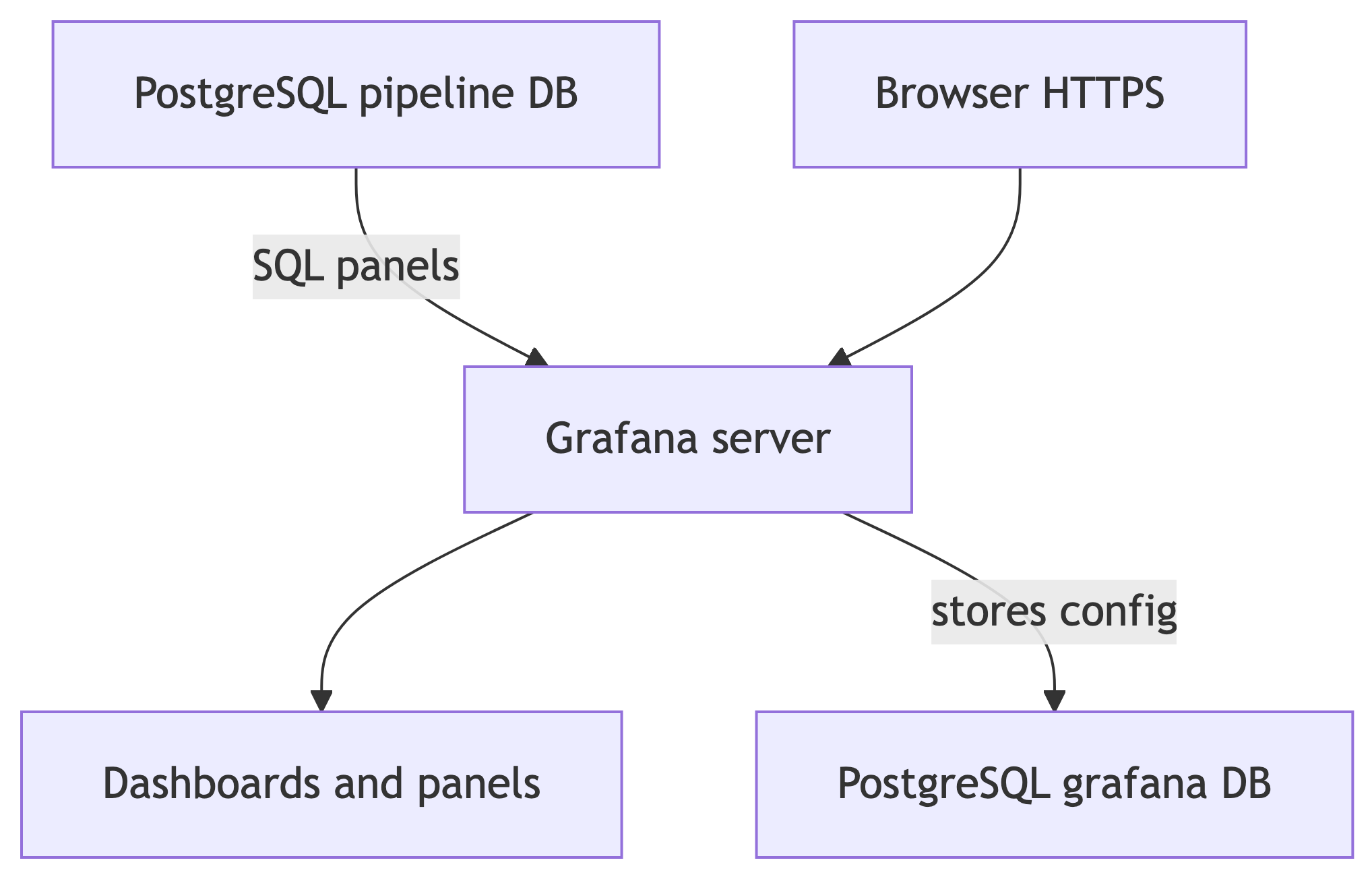
- Analytics data lives in your pipeline database (after restore, that is the class dataset).
- Grafana metadata (dashboards, users, data source definitions) should live in a separate database so you can rebuild or clone pipeline data without losing UI work.
Part 3: Views for Dashboards
Why Views?
A view is a named SELECT. It behaves like a read-only table for clients.
- Hides long joins and aggregations behind one name
- Reuse the same logic from Grafana, APIs, and ad hoc queries
- Lets you grant
SELECTon views to a read-only role without exposing base tables - When logic changes, you update the view once, not every panel
Views do not magically cache results unless you use a materialized view. For class-scale data, ordinary views are fine.
Dataset After Restore
After you restore railway_dump.dump, you should see the census, business, temperature, and survey tables from the advanced-queries style curriculum, plus the views below (names may match exactly).
| Table | Approximate role |
|---|---|
us_counties_pop_est_2019 |
County population and components of change |
cbp_naics_72_establishments |
Food and accommodation establishments by area |
temperature_readings |
Daily readings for three stations |
ice_cream_survey |
Long-format survey responses |
Part 4: Dashboard-Ready Views (Review)
View: v_state_population_summary
State-level totals and natural increase. Good for sorted bar charts or tables.
CREATE OR REPLACE VIEW v_state_population_summary AS
SELECT
    state_name,
    count(*) AS num_counties,
    sum(pop_est_2019) AS total_pop,
    round(avg(pop_est_2019), 0) AS avg_county_pop,
    sum(births_2019) AS total_births,
    sum(deaths_2019) AS total_deaths,
    sum(births_2019) - sum(deaths_2019) AS natural_increase
FROM us_counties_pop_est_2019
GROUP BY state_name
ORDER BY total_pop DESC;
View: v_state_migration_rates
Rates per thousand and a direction label. Good for horizontal bar charts and color by category.
CREATE OR REPLACE VIEW v_state_migration_rates AS
WITH state_migration AS (
    SELECT
        state_name,
        sum(international_migr_2019 + domestic_migr_2019) AS net_migration,
        sum(pop_est_2018) AS base_pop
    FROM us_counties_pop_est_2019
    GROUP BY state_name
)
SELECT
    state_name,
    base_pop,
    net_migration,
    round((net_migration / base_pop::numeric) * 1000, 2) AS migration_rate_per_thousand,
    CASE
        WHEN net_migration > 0 THEN 'Gaining'
        WHEN net_migration < 0 THEN 'Losing'
        ELSE 'Stable'
    END AS migration_direction
FROM state_migration
ORDER BY migration_rate_per_thousand DESC;
View: v_county_growth_summary
Aggregates counties by growth category. Natural pie or stat panels.
CREATE OR REPLACE VIEW v_county_growth_summary AS
WITH county_growth AS (
    SELECT
        county_name,
        state_name,
        pop_est_2019,
        CASE
            WHEN pop_est_2019 > pop_est_2018 THEN 'Growing'
            WHEN pop_est_2019 < pop_est_2018 THEN 'Shrinking'
            ELSE 'Stable'
        END AS growth_category
    FROM us_counties_pop_est_2019
)
SELECT
    growth_category,
    count(*) AS num_counties,
    sum(pop_est_2019) AS total_pop,
    round(avg(pop_est_2019), 0) AS avg_county_pop,
    round(count(*)::numeric / (SELECT count(*) FROM us_counties_pop_est_2019) * 100, 1)
        AS pct_of_counties
FROM county_growth
GROUP BY growth_category
ORDER BY num_counties DESC;
View: v_state_estabs_per_capita
Establishments per thousand residents by state. Good ranked bar chart.
CREATE OR REPLACE VIEW v_state_estabs_per_capita AS
WITH estabs AS (
    SELECT st, sum(establishments) AS establishment_count
    FROM cbp_naics_72_establishments
    GROUP BY st
),
pop AS (
    SELECT state_name, sum(pop_est_2018) AS total_pop
    FROM us_counties_pop_est_2019
    GROUP BY state_name
)
SELECT
    pop.state_name,
    pop.total_pop,
    estabs.establishment_count,
    round((estabs.establishment_count / pop.total_pop::numeric) * 1000, 1)
        AS estabs_per_thousand
FROM estabs
JOIN pop ON estabs.st = pop.state_name
ORDER BY estabs_per_thousand DESC;
View: v_seasonal_temperatures
Season labels for each station. Ideal grouped bar chart.
CREATE OR REPLACE VIEW v_seasonal_temperatures AS
WITH labeled_readings AS (
    SELECT
        station_name,
        CASE
            WHEN date_part('month', observation_date) IN (12, 1, 2) THEN 'Winter'
            WHEN date_part('month', observation_date) IN (3, 4, 5)  THEN 'Spring'
            WHEN date_part('month', observation_date) IN (6, 7, 8)  THEN 'Summer'
            WHEN date_part('month', observation_date) IN (9, 10, 11) THEN 'Fall'
        END AS season,
        max_temp,
        min_temp
    FROM temperature_readings
)
SELECT
    station_name,
    season,
    round(avg(max_temp), 1) AS avg_max_temp,
    round(avg(min_temp), 1) AS avg_min_temp,
    count(*) AS num_readings
FROM labeled_readings
GROUP BY station_name, season
ORDER BY station_name,
    CASE season
        WHEN 'Winter' THEN 1
        WHEN 'Spring' THEN 2
        WHEN 'Summer' THEN 3
        WHEN 'Fall' THEN 4
    END;
View: v_population_tiers
County tiers by size. Strong population share story in one table.
CREATE OR REPLACE VIEW v_population_tiers AS
WITH tiers AS (
    SELECT
        county_name,
        state_name,
        pop_est_2019,
        CASE
            WHEN pop_est_2019 >= 500000 THEN 'Metro'
            WHEN pop_est_2019 >= 100000 THEN 'Urban'
            WHEN pop_est_2019 >= 50000 THEN 'Suburban'
            ELSE 'Rural'
        END AS tier
    FROM us_counties_pop_est_2019
)
SELECT
    tier,
    count(*) AS num_counties,
    sum(pop_est_2019) AS total_pop,
    round(avg(pop_est_2019), 0) AS avg_county_pop,
    round(sum(pop_est_2019)::numeric /
        (SELECT sum(pop_est_2019) FROM us_counties_pop_est_2019) * 100, 1)
        AS pct_of_total_pop
FROM tiers
GROUP BY tier
ORDER BY
    CASE tier
        WHEN 'Metro' THEN 1
        WHEN 'Urban' THEN 2
        WHEN 'Suburban' THEN 3
        WHEN 'Rural' THEN 4
    END;
Quick Check: Views vs. Inline SQL in Grafana
Why define views instead of pasting huge queries into every panel?
- A. Views always cache results for Grafana
- B. Views give a stable, reusable interface and cleaner permissions
- C. Grafana cannot run SQL
- D. Views refresh on a timer automatically
B. Non-materialized views still run fresh SQL. The win is naming, reuse, and security boundaries.
Part 5: Crosstabs and Pivot-Style Reporting
tablefunc and Long-to-Wide Data
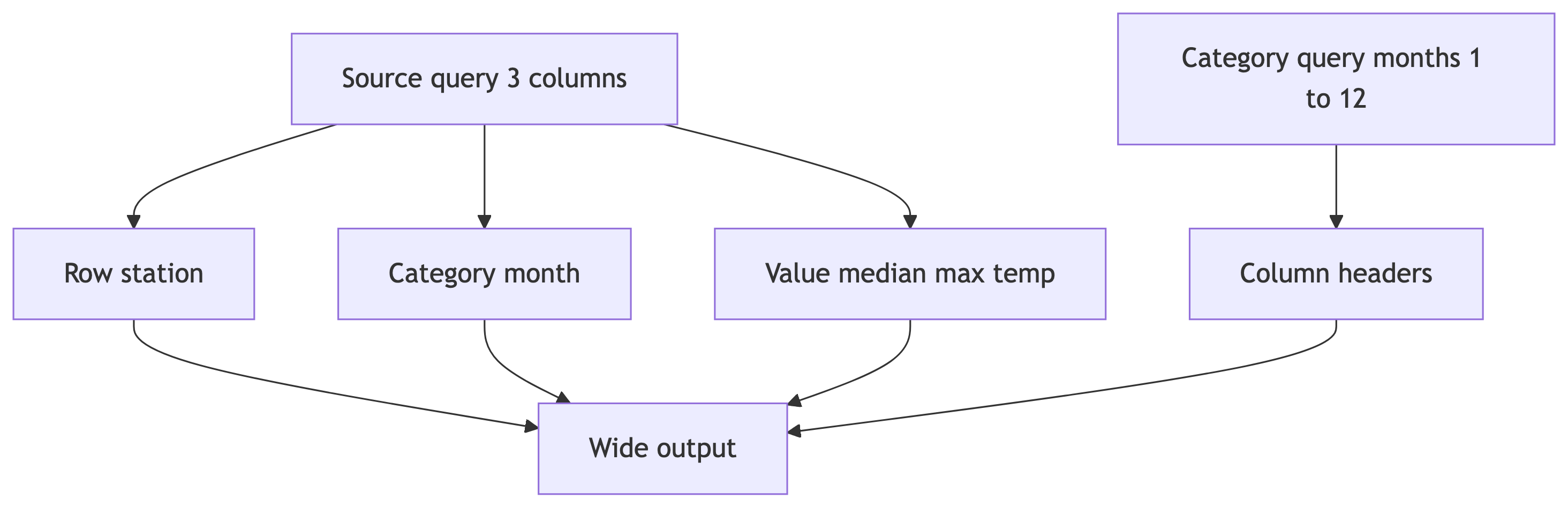
Reporting often needs wide tables: one row per entity, many metric columns. Raw surveys and events are usually long: one row per observation.
Ice Cream Survey Pivot
Long format: one row per person and flavor choice. Wide format: offices on rows, flavors as columns.
Grafana note: This returns a table shape. Use a Table panel, not a bar chart, unless you unpivot again in SQL.
Temperature Median Pivot by Month
SELECT *
FROM crosstab(
    'SELECT station_name,
            date_part(''month'', observation_date),
            percentile_cont(.5)
                WITHIN GROUP (ORDER BY max_temp)
     FROM temperature_readings
     GROUP BY station_name,
              date_part(''month'', observation_date)
     ORDER BY station_name',
    'SELECT month FROM generate_series(1,12) month'
)
AS (station text,
    jan numeric(3,0), feb numeric(3,0), mar numeric(3,0),
    apr numeric(3,0), may numeric(3,0), jun numeric(3,0),
    jul numeric(3,0), aug numeric(3,0), sep numeric(3,0),
    oct numeric(3,0), nov numeric(3,0), dec numeric(3,0));
Quick Check: crosstab() Shape
The source query passed to crosstab() must return how many columns?
- A. 2
- B. 3
- C. 4
- D. It depends on the number of categories
B. Row id, category, value. The second query lists category labels for column order.
Part 6: Follow-Along — PostgreSQL 18 and Restore
Step 1: New Railway Project and Postgres 18
- In Railway, create a new project (empty is fine).
- Add PostgreSQL. In the database service Settings, choose PostgreSQL 18 if the platform exposes a version selector or image tag; otherwise use the image your instructor pins for this term.
- Wait until the service is healthy. Open Variables (or Connect) and copy the public database URL Railway exposes for external access (often named
DATABASE_PUBLIC_URL, or shown under Public network / TCP Proxy on the Connect tab). You will use this same URL style for Beekeeper, pgAdmin,psql, andpg_restoreon your laptop.
Important: Anything you run on your own computer must use that public URL. Private hostnames such as *.railway.internal only resolve inside Railway’s network and will fail from your laptop.
Step 2: Download the Dump
From Canvas, download railway_dump.dump. This file is a custom-format archive intended for PostgreSQL 18 and pg_restore.
If you cannot install client tools, use the optional plain railway_dump.sql from Canvas instead (run it in Beekeeper or pgAdmin, or with psql -f).
Step 3: Restore with pg_restore
In a terminal on the machine that has the file:
--no-owner --no-aclavoid errors about roles and permissions that do not exist on Railway.- The database name in the URL is often
railway; use whatever Railway shows. - Client version: prefer pg_restore 18 to match the server. Older clients sometimes fail against newer servers.
Step 4: Verify in a SQL Client
Connect with Beekeeper Studio or pgAdmin using the public URL (paste the full URL or fill host, port, user, password, and database from it). Confirm:
- Tables such as
us_counties_pop_est_2019,ice_cream_survey,temperature_readings - Views such as
v_state_population_summary - Extension
tablefuncif the dump included it (needed forcrosstab()examples)
Step 5: Plain SQL Fallback
If pg_restore is not available:
- Download
railway_dump.sqlfrom Canvas. - Execute the entire script while connected to your Railway database (Beekeeper Run, pgAdmin Query Tool, or
psql "$DATABASE_PUBLIC_URL" -f railway_dump.sql).
Part 7: Follow-Along — Grafana on Railway
Create the grafana Database
In Beekeeper or pgAdmin, connected to the same Postgres server:
Grafana will store dashboards here. Skipping this step usually means lost dashboards after redeploys.
Add Grafana (Template)
- In the same Railway project, Create then Template and search Grafana.
- Deploy. Note the public URL Grafana receives; set
GF_SERVER_ROOT_URLto that fullhttps://...value after the first deploy if the template asks for it.
Environment Variables (Checklist)
Admin login
| Key | Value |
|---|---|
GF_SECURITY_ADMIN_USER |
admin |
GF_SECURITY_ADMIN_PASSWORD |
strong password you keep |
Grafana config database
| Key | Value |
|---|---|
GF_DATABASE_TYPE |
postgres |
GF_DATABASE_HOST |
host:port from the same public Postgres URL you use in Beekeeper (not a private internal hostname) |
GF_DATABASE_NAME |
grafana |
GF_DATABASE_USER |
postgres (unless Railway uses another superuser name) |
GF_DATABASE_PASSWORD |
from Postgres service variables |
GF_DATABASE_SSL_MODE |
usually require when using the public endpoint (match Railway’s docs if the test fails) |
Enable Serverless on Grafana if you want the service to sleep when idle.
Read-Only Role for Panel Queries
Still connected to the pipeline database (not grafana):
In Grafana, add the PostgreSQL data source for the pipeline database using the public host and port (same as Beekeeper), database name (often railway), user grafanareader, and TLS/SSL mode require unless Railway’s Connect instructions say otherwise.
Part 8: Demo — Build Panels Step by Step
Assume you are logged into Grafana as admin and the PostgreSQL data source Save & test succeeded against the restored database.
Demo A: Top States by Population (Bar Chart)
- Dashboards then New then New dashboard.
- Add visualization. Pick your PostgreSQL data source.
- Set query editor to Code (SQL). Paste:
- Visualization: Bar chart.
- In Panel options, set category field to
state_nameand value field tototal_pop. - Title the panel clearly, for example Top 15 states by estimated 2019 population.
Demo B: Migration Rates (Horizontal Bar)
- Add visualization on the same dashboard.
- SQL:
- Visualization: Bar chart, orientation horizontal.
- Optional: under Overrides, color by field
migration_direction(map Gaining, Losing, Stable to different colors). - Title: Net migration rate per 1,000 residents (selected states).
Demo C: Seasonal Temperatures (Grouped Bar)
- Add visualization.
- SQL:
- Visualization: Bar chart, mode grouped (exact control names vary by Grafana version; look for grouping by
station_namewithseasonas series or x-axis categories depending on the panel). - Title: Average max temperature by station and season.
Demo D (Optional Table): Ice Cream Crosstab
- Add visualization then choose Table.
- Paste the full
crosstabquery from Part 5 (ice cream example). - Run query. Confirm columns are office plus flavor counts.
- Title: Ice cream preferences by office (pivot).
Talking point: Views feed most charts; pivots often stay as tables unless you reshape data further for chart types.
Part 9: Your Turn
During Class
Replicate the follow-along: Postgres 18, restore, Grafana with grafana database, read-only user, then build a dashboard with at least four panels. Mix views and at least one table (a view or a crosstab query).
Take-Home Reference
Download the lab steps as grafana-lab-handout.pdf or the LaTeX source grafana-lab-handout.tex if you want to edit or recompile locally. Your instructor may mirror the PDF on Canvas.
Summary
| Topic | Takeaway |
|---|---|
| Pipeline role | Dashboards visualize vetted data; they are not the transform layer |
| Views | Named, reusable, permission-friendly interfaces for panels |
| Crosstabs | crosstab() builds wide tables; great for Table panels |
| Restore | pg_restore --no-owner --no-acl -d "$DATABASE_PUBLIC_URL" file.dump |
| Grafana persistence | Separate grafana database for config |
| Security | Read-only DB user for Grafana queries |