Week 3: DS3 Framework
DATA 510: Data Science Capstone
Abstract
Week 3 framework briefing. A guided tour of Data Science Studio Scrum (DS3): why it exists, how the studio and dual-role membership work, the six artifacts, the five-column Iterative Development board, the weekly Studio Session, the Brief / Critique loop and SLAs, and the operational tooling (GitHub repo, Projects board, Discord). Closes with a pre-flight for tonight’s Studio Charter activity so we can transition straight from this deck into chartering.
Learning Objectives
Today’s Objectives
What You Will Leave With
By the end of this session, you will be able to:
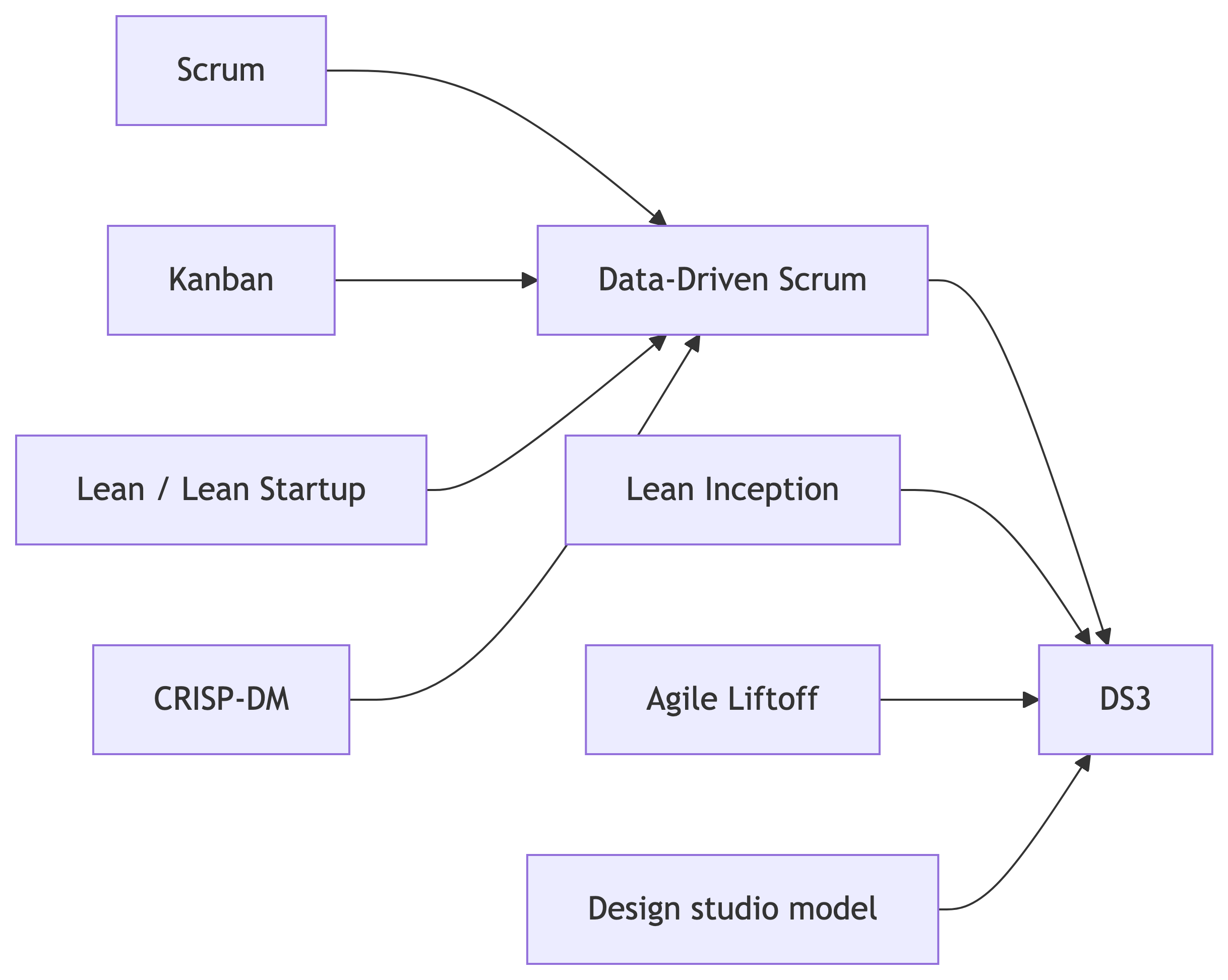
- Explain why DS3 exists and what it adapts from DDS, Lean Inception, and the design studio model.
- Name the six DS3 elements (T-DPO, SB-SC, ACO, DRSM, MTB, Studio Charter) and what each contributes.
- Describe Triadic Distributed Product Ownership and the dual-role rule that puts every student in three studios.
- Walk a Product Backlog Item through the five-column Iterative Development board, including the WIP cap and the Definition of Done gate.
- Identify the artifacts you must commit to your repo by the end of week 3 and what your studio will produce in tonight’s chartering activity.
Course Connection
This session supports your project proposal (M1, end of W4), every weekly Studio Session from W4 through W13, and the Stakeholder participation component of the course grade (15%, with a published rubric and a participation floor).
Part 1: Why DS3
Why a Capstone Needs Its Own Framework
What Industrial Agile Assumes
Scrum, Kanban, and even data-tailored Data-Driven Scrum (DDS) all assume:
- A single empowered product owner with continuous availability.
- A co-located cross-functional team working full time on one product.
- Capability-based iterations that finish whenever the next experiment finishes.
- A surrounding organization that supplies stakeholders, sponsors, and end users.
. . .
A graduate data science capstone has none of those.
What a Graduate Capstone Actually Has
- A fixed weekly meeting (one 120-minute class block).
- Hard milestone deadlines on the academic calendar.
- An instructor approval gate for data, scope, and ethics.
- Students who are simultaneously workers on their own project and outside voices on a peer’s project.
The closest analog in higher education is the design studio in architecture and the visual arts: many parallel projects, periodic public critiques, and a teaching artist who facilitates rather than commissions.
DS3 in One Sentence
DS3 is what DDS looks like if it accepts the studio as its host environment instead of an industrial product team.
The Six Novel Elements of DS3
| Element | What it adds beyond DDS |
|---|---|
| T-DPO Triadic Distributed Product Ownership | Three voices in the PO triad: owner team plus two or three peer PO individuals from adjacent capstones |
| SB-SC Studio Brief / Studio Critique | A weekly written loop: brief for the next iteration, critique on the last one |
| ACO Academic Cadence Overlay | Capability-based iterations inside a fixed weekly class meeting |
| DRSM Dual-Role Studio Membership | Every student is an Owner on one project and a Peer PO on two adjacent projects |
| MTB Milestone-Tagged Backlog | Every PBI carries a milestone tag (M1..M5, infra, ethics) |
| Studio Charter | A single-session inception that produces a committed CHARTER.md and seeded backlog |
Goals and Non-Goals
Goals
- Give students transferable experience with industry-proven processes (Scrum, Kanban, Lean, DDS, CRISP-DM).
- Run end to end inside one class block per week, with no out-of-class coordination overhead.
- Be repeatable: another instructor can pick this up next term without custom code.
- Preserve the empirical, hypothesis-driven character of DDS.
. . .
Non-goals
- DS3 is not a scaling framework. It does not replace milestone rubrics, grading, or Canvas submissions.
Part 2: The Studio and Dual-Role Membership
The Studio
What a Studio Is
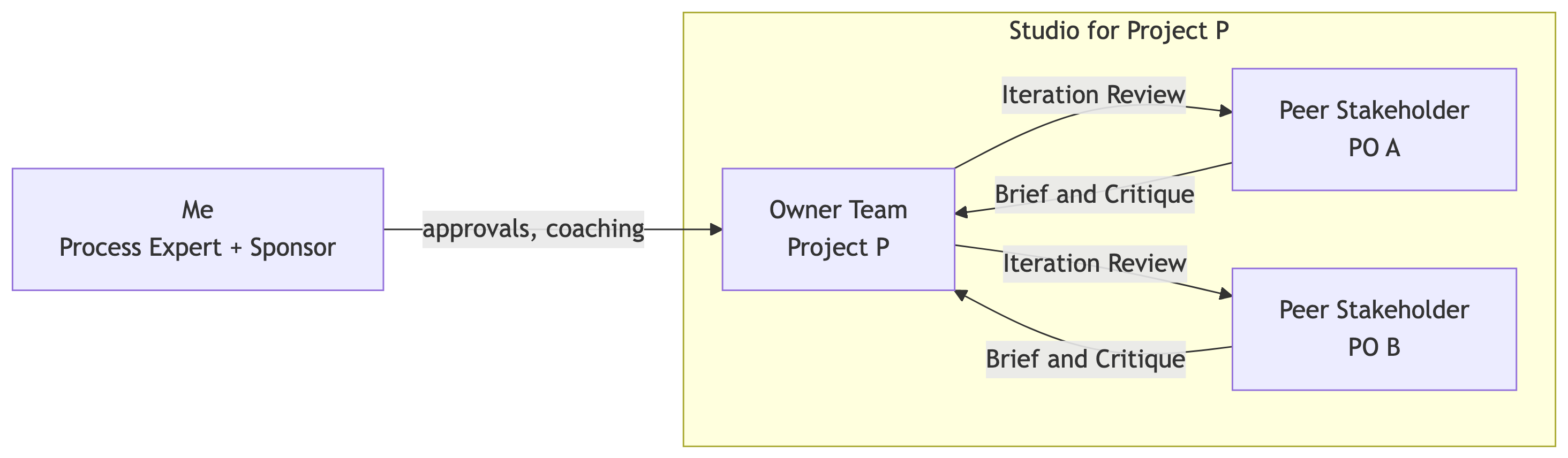
A studio is one project plus the people who own and review it for the term:
- The owner team (1 to 3 students) who build the project.
- Two or three peer Stakeholder POs drawn from adjacent capstone projects.
- Me (Process Expert and Sponsor) sitting above the triad as approver and arbiter.
Roles Inside a Studio
| Role | Filled by | Core responsibilities |
|---|---|---|
| Owner Product Lead | One named student on the owner team (solo students are their own lead) | Drives the Studio Session, owns the backlog and board, integrates Briefs into the next iteration plan |
| Owner Team | All members of the project (1 to 3) | Cross-functional execution: Create / Observe / Analyze on each pulled PBI |
| Peer Stakeholder PO (2 or 3 per project) | Assigned individuals from adjacent capstones | File a written Studio Brief and Studio Critique each week; treat the project as if they were a domain customer |
| Process Expert | Me | Coach DS3 mechanics, remove impediments, enforce academic cadence, mediate priority conflicts |
| Sponsor | Me | Approve data sources and scope, sign off on milestones, hold final authority |
The Dual-Role Rule
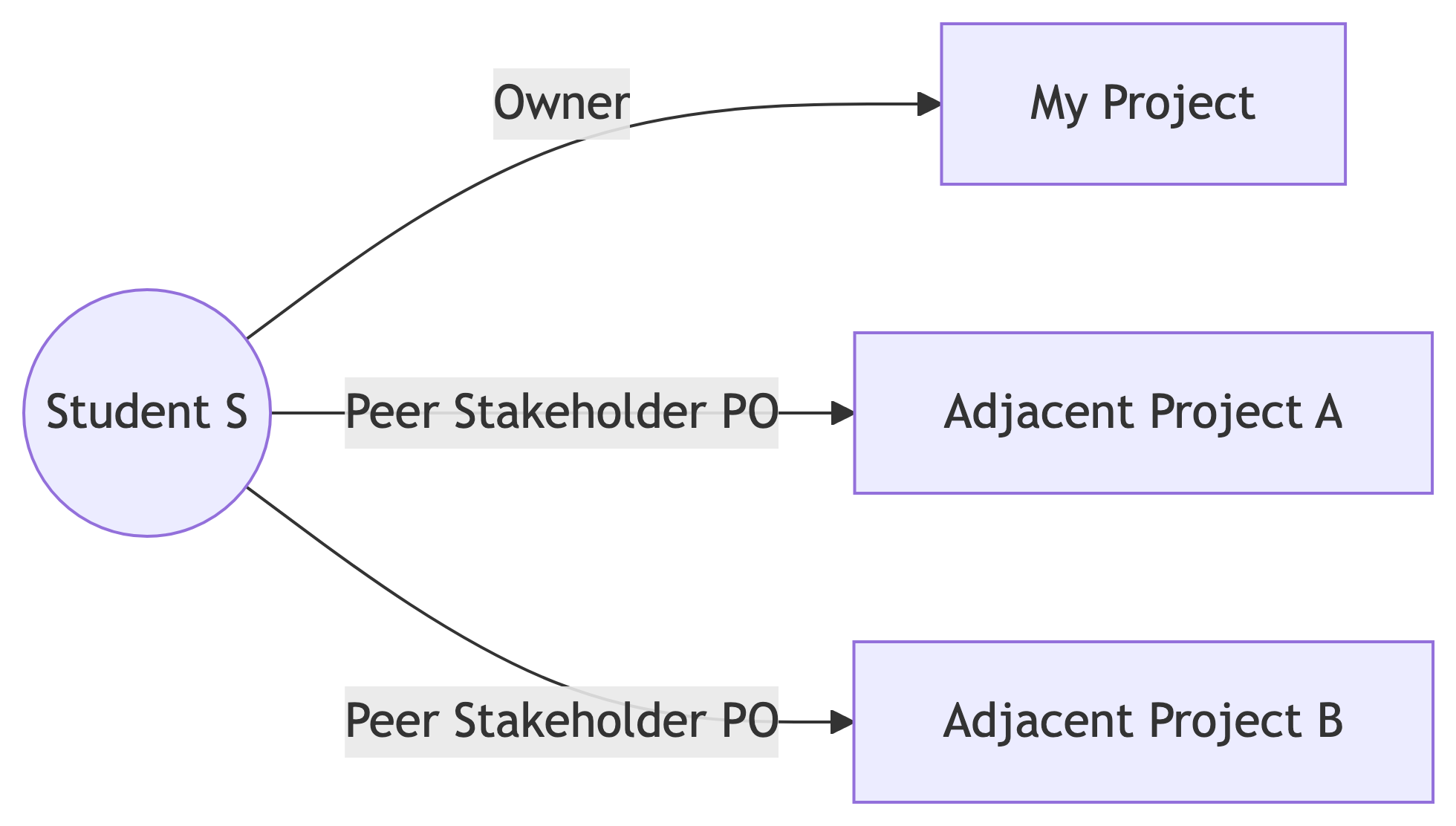
Every student plays two roles in parallel:
- Owner on exactly one project (their own).
- Peer Stakeholder PO on exactly two adjacent projects.
Their two stakeholder assignments land in the two Studio Sessions other than their own project’s session, so they attend both in person every week.
Why the Dual-Role Design
Most data science failures look the same from the producer side and from the receiver side. In DS3, every student lives on both sides every week:
- As an Owner you feel what it is like when feedback arrives late, vague, or off-target.
- As a Peer PO you feel what it is like to write feedback that someone else has to actually act on.
That symmetry is the point. It is graded as the Stakeholder participation component (15% of the course grade). Full assignments live on the Peer Stakeholder PO lookup.
Part 3: Artifacts and Iteration Mechanics
Six Artifacts
The Six DS3 Artifacts
DS3 inherits four artifacts from DDS and adds two.
| Artifact | Origin | What it is |
|---|---|---|
| Product Backlog | DDS / Scrum | Prioritized list of PBIs; each PBI has a hypothesis, a Create / Observe / Analyze triple, and a milestone tag |
| Item Breakdown Board (IBB) | DDS | Workspace where the top of the backlog is exploded into tasks during refinement |
| Task Board | DDS / Kanban | Visible flow with five columns: Backlog, Create, Observe, Analyze, Done |
| Iteration Review Report | DDS | Weekly README section: completed PBIs, board snapshot, what was created / observed / analyzed |
| Studio Brief (new in DS3) | Lean Inception, Liftoff | One-page peer PO document filed before the next iteration: requirements, questions, risks |
| Studio Critique (new in DS3) | Studio model + DDS Iteration Review | One-page peer PO document filed after the iteration: assesses delivery vs charter and prior brief |
DDS High-Level Flow of Work
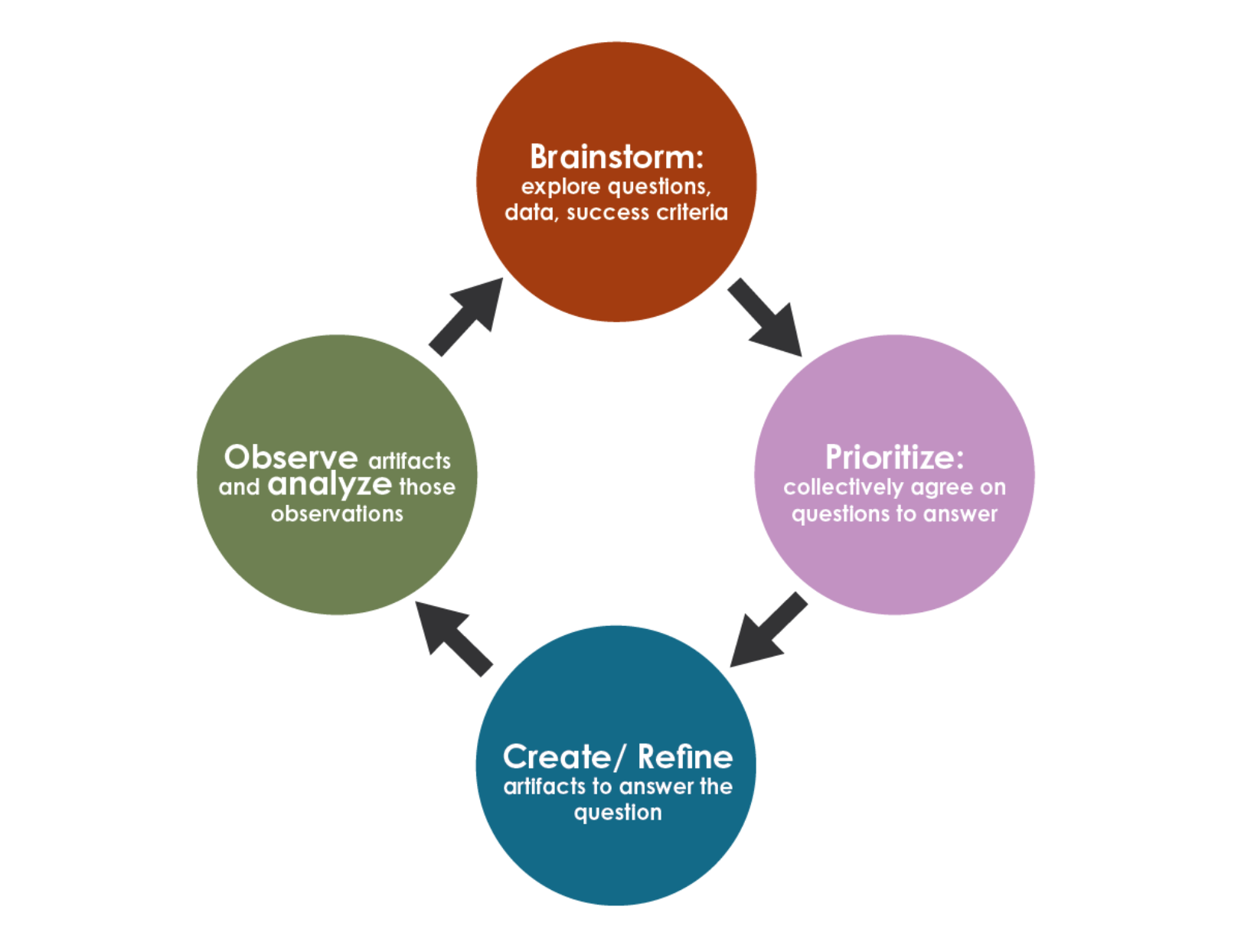
- Brainstorm items (questions, hypotheses, spikes).
- Prioritize given current data and modeling needs; pull the top item.
- Create and refine pipelines, models, visuals, docs tied to that item.
- Observe results together and reprioritize.
This is the metabolism every iteration runs on, in DDS and in DS3.
DDS Core Artifacts (DS3 Keeps All Four)
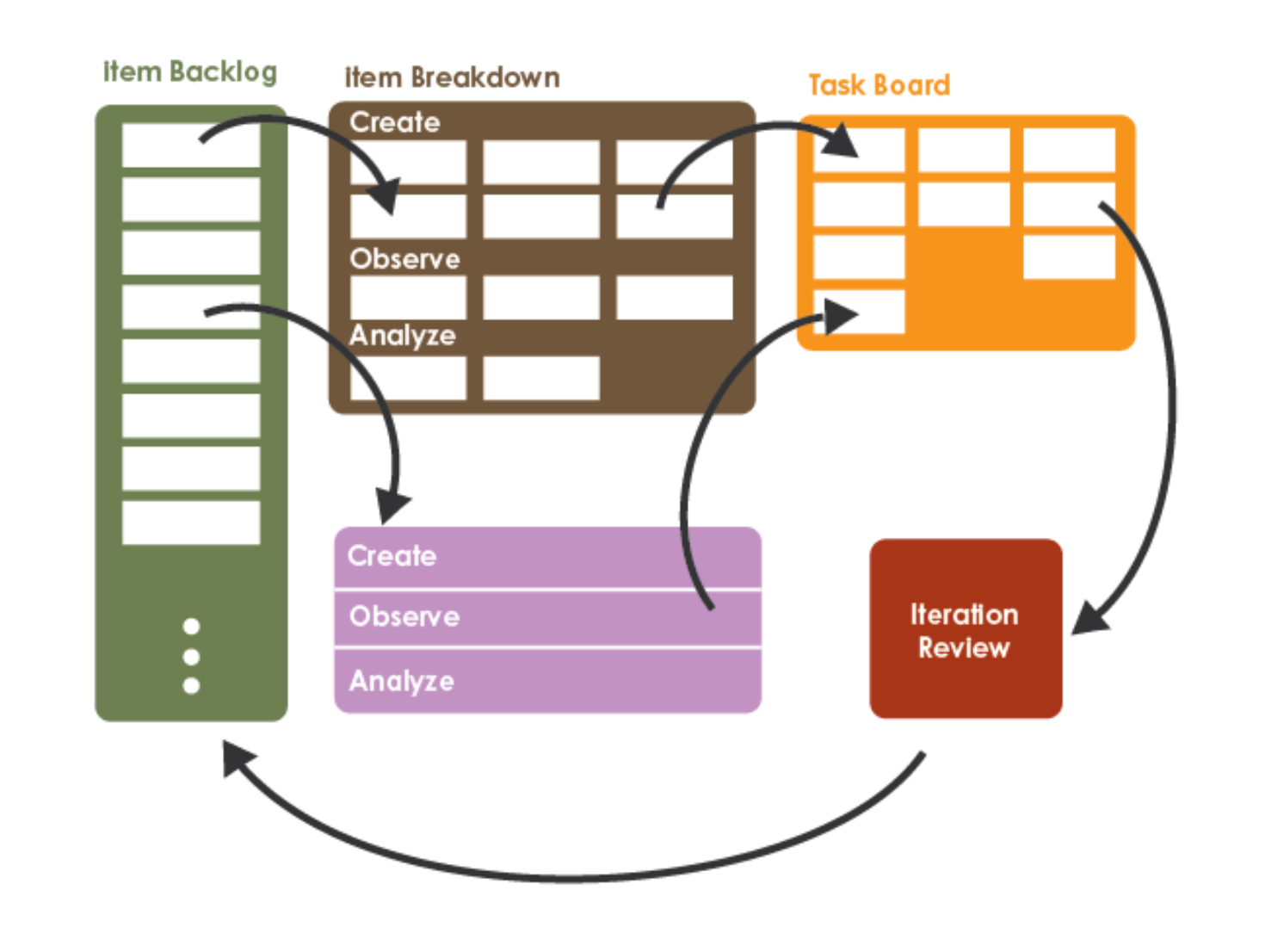
DS3 adds Studio Brief and Studio Critique on top, and tags every backlog item with a milestone.
The Create / Observe / Analyze Triple
Every PBI must answer three questions, not one:
| Phase | What you produce |
|---|---|
| Create | The artifact: ingestion script, model, draft figure, draft section. Something exists in the repo. |
| Observe | Evidence about that artifact: row counts, evaluation metrics, sanity checks. A measurement is recorded. |
| Analyze | Interpretation of the evidence: a written decision (continue, pivot, kill, decompose). A next step is named. |
. . .
Data science fails when teams create something and declare victory before observing whether it works, and long before analyzing what the result means.
Capability-Based, Not Time-Boxed
DS3 keeps DDS’s two crucial mechanics:
- Iterations are capability-based. An iteration ends when its Create / Observe / Analyze cycle finishes, whether that takes 3 days or 2 weeks.
- Meetings are time-based. Standups, reviews, briefs, critiques, and retros all happen on the class calendar, regardless of where each project’s iteration sits.
. . .
This decoupling is the Academic Cadence Overlay (ACO). It lets data science work breathe while the weekly ritual stays predictable.
Milestone-Tagged Backlog (MTB)
Every PBI carries a tag so process never drifts away from grades.
| Tag | Milestone | Week |
|---|---|---|
M1-proposal |
Project Proposal | 4 |
M2-data-summary |
Data Summary | 7 |
M3-poster-draft |
Poster Rough Draft | 10 |
M4-writeup-draft |
Write-up Rough Draft | 12 |
M5-final |
Final Poster + Write-up | 14 |
infra |
(cross-cutting engineering) | – |
ethics |
(cross-cutting governance) | – |
PBIs without a milestone tag are a smell. I flag them during refinement.
Part 4: The Iterative Development Board
Five Columns, One Lifecycle
The Board at a Glance

The columns are not work types (“the modeling column”). They are phases of work on a single PBI.
What Each Column Means
| Column | The PBI is here when… | Trigger to next column |
|---|---|---|
Backlog |
The PBI is prioritized but may not yet meet the Definition of Ready | Owner Lead confirms DoR and the team has WIP slack |
Create |
The team is building the artifact named in the PBI | Create artifact is committed (or linked) |
Observe |
The team is running the experiment / measurement | Observe results are recorded somewhere referenceable |
Analyze |
The team is interpreting the Observe results vs the hypothesis | Analyze writeup is in next Iteration Review draft and a peer PO has signed off or critiqued |
Done |
The PBI passes the Definition of Done and is linked in the next Iteration Review | (Don’t archive mid-term; we use these for milestone retros) |
Why Not “To Do / Doing / Done”?
Data science fails in a specific way:
Teams create something and declare victory before they have observed whether it answers the question, and long before they have analyzed what the observation means.
. . .
Splitting the in-flight portion into three named phases makes it impossible to skip steps without it being visible to the peer POs and to me.
WIP and Ownership
- WIP cap.
Create + Observe + Analyzetotal is at most owners + 1 at any moment. (Solo: 2. Pair: 3. Triple: 4.) - Who moves cards. The Owner team moves cards forward. The Owner Product Lead is responsible for board hygiene.
- What peer POs do. They comment on issues and drop suggestions in Studio Briefs. They do not push owner cards across columns.
- What I do. During the Instructor Sync slot I open the board, walk it column by column, and call out anything stuck or in the wrong column.
Capability-Based on the Board
A PBI can sit in Observe for two weeks if the experiment legitimately takes that long.
. . .
The board does not reset at the end of the week. The class meeting and the Iteration Review still happen on the academic calendar regardless of where each project’s PBIs are. That is the Academic Cadence Overlay at work.
How the Board Feeds the Iteration Review
Every PBI that crossed into Done since the last Iteration Review becomes a bullet in this week’s README.md:
PBIs that crossed into Create, Observe, or Analyze but did not finish go under In-flight (carrying across the boundary).
. . .
This is the bridge between the live board (a snapshot of “right now”) and the README log (the durable weekly history that peer POs read before filing the next Brief and Critique).
Definition of Ready / Definition of Done
Definition of Ready (Backlog → Create)
- One-sentence hypothesis or user story
- Named Create / Observe / Analyze triple
- Milestone tag (
M1..M5,infra,ethics) - T-shirt size (S, M, L, XL)
- WIP slack on the board
Definition of Done (Analyze → Done)
- Create artifact in the repo or linked from the issue
- Observe results recorded somewhere referenceable
- Analyze writeup names a next step
- A peer PO has signed off or filed a Critique
- Card is linked under Completed PBIs in the next Iteration Review
The full DoR / DoD lives in your CHARTER.md. We will write yours tonight.
Part 5: The Weekly Studio Session
Three 40-Minute Sessions
Weekly Cadence at a Glance

Submission times are set per studio in the CHARTER.md Working agreements. Sunday-before-class is the default for our Monday meeting.
The 120-Minute Class Block
The class block hosts three sequential 40-minute Studio Sessions. Each project is assigned to one session for the term.
| Block | Time (8:00 - 10:00 PM) | Who attends |
|---|---|---|
| Studio Session 1 | 8:00 - 8:40 | Projects assigned to Session 1 + their peer POs |
| Transition | 8:40 - 8:45 | Stakeholders shift tables |
| Studio Session 2 | 8:45 - 9:20 | Projects assigned to Session 2 + their peer POs |
| Transition | 9:20 - 9:25 | Final shift |
| Studio Session 3 | 9:25 - 10:00 | Projects assigned to Session 3 + their peer POs |
Inside each 40-minute slot, every assigned project runs the same agenda in parallel at separate tables.
The 40-Minute In-Session Agenda
| Phase | Time | What happens |
|---|---|---|
| 1. Owner standup | 5 min | Yesterday / today / blockers at the board (also posted in #standup) |
| 2. Studio Critique discussion | 10 min | Peer POs walk the team through their written critique of last week’s delivery |
| 3. Studio Brief discussion | 10 min | Peer POs walk through their written brief; team adopts / defers / declines each item |
| 4. Backlog refinement and board walk | 10 min | Walk the board left to right; refine top of Backlog to DoR; pull new cards up to WIP cap |
| 5. Instructor sync and commitment | 5 min | I scan the board; team logs its iteration commitment to the repo |
Why Heavy on Written Artifacts
The point of the session is not to write Briefs and Critiques in the room.
. . .
The point is to discuss what was already written before class, so:
- Peer POs cannot ghost the ritual.
- Owners cannot wave away feedback that exists in print.
- The audit trail is committed to git, not to memory.
Between-Class Cadence
Written cadence runs on each project’s GitHub repo, mirrored to its Discord category:
- Iteration Review in
README.mdby the Sunday before next class. - Studio Brief in
studio/briefs/W<NN>-<peer>.mdby the Sunday default. - Studio Critique in
studio/critiques/W<NN>-<peer>.mdby the Sunday default. - Blockers flagged in
#blockers; I respond there or in the next Studio Session. - Retrospective at milestone boundaries (W4, W7, W10, W12, W14).
Milestone Weeks Compress the Slot
On milestone weeks the agenda shrinks to make room for the deliverable itself.
| Phase | Compressed time |
|---|---|
| Owner standup | 3 min |
| Studio Critique (milestone-tagged only) | 7 min |
| Studio Brief (next milestone tag only) | 5 min |
| Milestone artifact work | 20 min |
| Instructor sync and commitment | 5 min |
Written Briefs and Critiques are still required that week.
Part 6: Briefs, Critiques, and SLAs
The Brief / Critique Loop
How the Loop Connects Two Class Meetings

Every week each peer PO owes two artifacts per project they support: a Brief looking forward and a Critique looking back.
Studio Brief Template (one page)
Stored at studio/briefs/W<NN>-<peer-name>.md in the owner team’s repo.
# Studio Brief, week <NN>, from <peer PO> to <owner team>

**Filed:** <date and time>
**For iteration starting:** <date>

## What we want you to consider for next iteration
1. <requirement, question, or risk> -- why it matters: <one sentence>
2. ...

## Why now
<one or two sentences linking to the project's current milestone tag>

## What we are not asking for
<one sentence so the owner team is not surprised>
Studio Critique Template (one page)
Stored at studio/critiques/W<NN>-<peer-name>.md in the owner team’s repo.
# Studio Critique, week <NN>, from <peer PO> to <owner team>

**Reviewing iteration ending:** <date>

## What you delivered
<one paragraph summary>

## Against last week's Studio Brief
- Item 1: <adopted / deferred / declined / partial>

## Against the Charter
- Still moving toward Vision and Mission? <yes / no / drifting because ...>
- On track for next milestone? <yes / no / at risk because ...>

## Two strengths / Two specific revisions
- ...
Response SLAs (Service Level Agreements)
A Service Level Agreement is a written promise the triad makes about how fast each side responds when a signal arrives. Without SLAs, a Brief drops into a void.
Five signals must have an SLA before you commit CHARTER.md:
| Signal | Who responds | Typical SLA |
|---|---|---|
| Studio Brief filed | Owner team | Acknowledge in #studio within 24h with adopt / defer / decline |
| Studio Critique filed | Owner team | Respond in #studio within 24h, capture follow-ups in backlog |
| Iteration Review posted | Both peer POs | Read before filing the next Brief and Critique |
Blocker flagged in #blockers |
Me + tagged peer PO | Respond by next Studio Session at the latest |
Clarifying question in #general |
Whoever is tagged | Reply within 48h |
How DS3 Stays Fair
The dual workload only works if everyone files briefs and critiques. DS3 makes it enforceable:
- Every Brief and Critique is a committed file with a timestamp. Missed weeks are visible.
- Owner teams must log adoption status for each Brief item. Quiet ignoring is not allowed.
- I audit the
studio/folder during each Instructor Sync. - Late or missing Briefs and Critiques count against the Stakeholder participation component (15% of the course grade). A participation floor caps this component at 50% if you miss 4 or more over the term.
Part 7: Operational Tooling
Two Tools, Provisioned in Week 3
What You Set Up This Week
DS3 lives in two operational tools:
- A per-project GitHub repo with a linked Projects (v2) board.
- A per-project Discord category inside the class server.
. . .
I provision the Discord categories. Owner teams provision the repo and board during the chartering session tonight.
GitHub Repo From Template
Bootstrap your repo from the DS3 template, do not start blank:
- Visit https://github.com/LucasCordova/ds3template.
- Click Use this template → Create a new repository. Name it
data510-<project-slug>. - Add
LucasCordovaas a collaborator with Admin access. - Add each peer PO as a collaborator with at least Triage access (they need to comment on issues, push Briefs and Critiques as commits or PRs).
- Fill in the placeholders in
README.mdandCHARTER.md(project name, owner team, peer POs, Studio Session, links).
What the Template Ships With
README.md          # Iteration Review per week (stubs for W4..W14)
CHARTER.md         # Charter template (vision, mission, SLAs, DoR/DoD)
BACKLOG.md         # Mirrors the Projects board, human readable
studio/
  briefs/          # _TEMPLATE.md + W<NN>-<peer-name>.md per peer PO
  critiques/       # _TEMPLATE.md + W<NN>-<peer-name>.md per peer PO
src/               # source code, with a layout README
notebooks/         # exploratory + reporting notebooks
data/              # raw / external / interim gitignored; processed committed
deliverables/      # M1..M5 milestone artifacts
.gitignore         # Python + data science + Quarto + OS defaults
You inherit the layout, naming, and .gitignore for free.
GitHub Projects Board: Bootstrap From My Template
The Projects board does not appear automatically when you create a repo, and a brand-new Project is not linked to any repo by default. Copy mine, do not build from scratch:
- Visit my template at https://github.com/users/LucasCordova/projects/3.
- Click the three dots (
⋯) in the upper-right, then Make a copy. - In the dialog: select yourself as Owner; name the project
@Project Board. - Open your copy, click the gear icon (Project Settings).
- Under Default repository, choose your project repo so the board is linked.
- Under Manage access, add each peer PO (Read or Write) and
LucasCordova(Admin). - Paste the board URL into
CHARTER.mdand pin it in your project’s#generalDiscord channel.
Discord: One Category Per Project
Class invite: https://discord.gg/RjkTUqzuch. On the welcome screen, click the buttons to opt into your own project’s category and each of your two peer projects’ categories.
| Channel | Purpose |
|---|---|
#general |
Day-to-day discussion, decisions, links, async Q&A. Pin the repo URL and Projects board URL. |
#standup |
Async written standups posted before each class (yesterday / today / blockers). |
#studio |
Peer POs drop links to their Brief and Critique here as soon as they are committed. |
#blockers |
Owner team flags impediments and data approval requests to me. |
Find Your Studio Right Now
Open the Peer Stakeholder PO lookup and find:
- Your project row. Note your Studio Session (1, 2, or 3) and your two or three peer POs.
- The two rows where you appear as a Stakeholder. Note those Studio Sessions; you attend both in person.
. . .
If your project + your two stakeholder rows fall into all three Studio Sessions exactly once, you are in the right place. If something looks off, email me before chartering.
Part 8: Capstone in Context
What This Framework Wraps
The Five Pillars
A capstone is not a process for its own sake. DS3 is the operating layer around the actual work, which still has to integrate the five pillars of the MS curriculum:
| Pillar | What it looks like in your project |
|---|---|
| Data engineering | Sourcing, cleaning, versioning, automating data so analyses are reproducible |
| Analytics / ML | Appropriate modeling or inference, validation discipline, honest limits |
| Visualization and communication | Graphics and narrative legible to technical and non-technical audiences |
| Ethics and responsible use | Privacy, consent, fairness, transparency, retention, deployment risk |
| Statistics and research design | Clear questions, baselines, evidence that matches the claim |
Silo pitches (“only a dashboard,” “only a model notebook”) get pushed to deepen before approval.
The Semester at a Glance

Every PBI you pull this term gets a milestone tag pointing at one of these weeks.
Where This Lecture Lands
You now know:
- Why DS3 exists and what it borrows.
- Who sits in your studio and the dual-role rule.
- What the six artifacts are and how the five-column board works.
- When the weekly Brief / Critique / Iteration loop runs.
- How you provision the GitHub repo, board, and Discord category.
. . .
What is left: turn the framework into your project’s CHARTER.md. That is tonight’s activity.
Part 9: Tonight’s Chartering Pre-Flight
How Chartering Runs Tonight
Chartering Runs on the Studio Schedule
The class block hosts three sequential 40-minute Charter Sessions, one per Studio Session, exactly the same schedule the rest of the term uses (W4 onward).
| Block | Time (8:00 - 10:00 PM) | Who is at the tables |
|---|---|---|
| Charter Session 1 | 8:00 - 8:40 | Studio Session 1 projects charter; their peer POs attend |
| Transition | 8:40 - 8:45 | Stakeholders move |
| Charter Session 2 | 8:45 - 9:25 | Studio Session 2 projects charter; their peer POs attend |
| Transition | 9:25 - 9:30 | Final shift |
| Charter Session 3 | 9:30 - 10:00 | Studio Session 3 projects charter; their peer POs attend |
Each project gets 40 minutes. Peer POs attend their two projects’ Charter Sessions in person.
Tooling Checklist
The project owner team will set up tooling:
Drafts in the Repo
CHARTER.md and BACKLOG.md will be worked on during the chartering session:
. . .
The 40-minute slot is for working on drafts with your peer POs. You will start with your project forming from the previous week.
The 40-Minute Charter Agenda
| Phase | Time | What happens |
|---|---|---|
| 1. Anchor | 5 min | Owner reads W2 snapshot + drafted Vision / Mission aloud; peer POs ask clarifying Qs only |
| 2. Vision / Mission / Context check | 8 min | Peer POs surface gaps; owner revises bullets in CHARTER.md live |
| 3. Success-criteria check | 7 min | Peer POs sanity-check that each milestone criterion is measurable + achievable |
| 4. Working agreements + Response SLAs | 12 min | Triad fills the SLA table together (5 signals); confirms Brief / Critique due times; locks DoR / DoD |
| 5. Backlog walkthrough | 6 min | Peer POs see the seeded backlog; suggest 1 to 2 additions; confirm milestone tags |
| 6. Commit | 2 min | Owner Product Lead commits CHARTER.md and BACKLOG.md in front of the table |
The slot ends with CHARTER.md and BACKLOG.md committed before the table breaks.
Roles in the Session (Same as the Studio)
| Who | Role tonight |
|---|---|
| Owner Product Lead | Drives the session, holds the keyboard, pushes for decisions when discussion stalls |
| Owner Team members | Co-author every section; do not delegate to the Lead |
| Peer Stakeholder POs | Full participants, not observers. Surface what they care about as the eventual customer |
| Me | Float between the project tables active in the current Studio Session, time-box phases, flag vague sections, arbitrate on data approval |
What Must Be Committed by End of Class
. . .
If your studio is missing a peer PO tonight, file a #blockers post, charter without them. The peer PO should follow up with the project owner before next week.
Begin Chartering
You have the framework. Your studio has the people. The repo and board are ready.
. . .
Find your table. Open CHARTER.md. The Owner Product Lead drives. Start with the Anchor.
Quick Links
Framework Pages
Tooling Links
- DS3 template repo: https://github.com/LucasCordova/ds3template
- DS3 Projects board template: https://github.com/users/LucasCordova/projects/3
- Class Discord invite: https://discord.gg/RjkTUqzuch
- Course syllabus: syllabus
References
References
- Saltz, J. S., Hotz, N., and Sutherland, A. (2022). Achieving Lean Data Science Agility Via Data Driven Scrum. HICSS 55. https://hdl.handle.net/10125/80218
- Data Science Process Alliance. Data Driven Scrum. https://www.datascience-pm.com/data-driven-scrum/
- Schwaber, K., and Sutherland, J. The Scrum Guide. https://scrumguides.org/
- Anderson, D. J., and Carmichael, A. The Kanban Guide. https://kanbanguide.org/
- Womack, J. P., and Jones, D. T. (2003). Lean Thinking. Free Press.
- Poppendieck, M., and Poppendieck, T. (2003). Lean Software Development. Addison-Wesley.
- Ries, E. (2011). The Lean Startup. Crown Business.
- Chapman, P., et al. (2000). CRISP-DM 1.0: Step-by-step data mining guide.
- Caroli, P. (2018). Lean Inception: How to Align People and Build the Right Product. Editora Caroli.
- Larsen, D., and Nies, A. (2016). Liftoff: Start and Sustain Successful Agile Teams (2nd ed.). Pragmatic Bookshelf.
- Schon, D. A. (1985). The Design Studio: An Exploration of its Traditions and Potentials. RIBA Publications.
- Shaffer, D. W. (2003). Portrait of the Oxford Design Studio: An Ethnography of Design Pedagogy. WCER Working Paper.