Data Science Studio Scrum (DS3)
A project framework for academic data science capstones
Abstract
Data Science Studio Scrum (DS3) is a capstone-grade adaptation of Data-Driven Scrum (DDS) that pairs each project team with two or three domain-matched peer “stakeholder product owner” individuals inside an instructor-facilitated studio. DS3 keeps DDS’s capability-based iterations and create / observe / analyze backlog items, but adds: (1) triadic distributed product ownership, (2) a weekly Studio Brief / Studio Critique loop, (3) an academic cadence overlay aligned to a fixed semester calendar, (4) a dual-role studio membership where every student is simultaneously an owner and a critic on adjacent projects, (5) milestone-tagged backlog items, and (6) a single-session Studio Charter inception. This page is the canonical reference; subpages describe the Studio Charter and the weekly Studio Session in operational detail.
Why DS3 (motivation and background)
Industrial agile frameworks (Scrum [3], Kanban [4]) and the data-science-tailored Data-Driven Scrum (DDS) [1, 2] all assume conditions that an academic capstone violates:
- A single empowered product owner with continuous availability.
- A co-located cross-functional team working full time on one product.
- Capability-based iterations that finish whenever the next experiment finishes.
- A surrounding organization that supplies stakeholders, sponsors, and end users.
A graduate data science capstone has none of those. Instead it has a fixed weekly meeting, hard milestone deadlines, instructor approval gates, and students who are simultaneously workers on their own project and outside voices on someone else’s. The closest analog in higher education is the design studio in architecture and the visual arts: many parallel projects, periodic public critiques, and a teaching artist who facilitates rather than commissions [11, 12].
DS3 is the result of asking, what would DDS look like if it accepted the studio as its host environment, instead of an industrial product team?
Goals:
- Give students genuine, transferable experience with industry-proven processes (Scrum, Kanban, Lean, Lean Startup, DDS, CRISP-DM, Lean Inception, Liftoff).
- Make the process actually executable inside one class block, every week, without out-of-class coordination overhead.
- Produce a repeatable instructor playbook so the framework can be picked up by another instructor next term with no custom code or special licensing.
- Preserve the empirical, hypothesis-driven character of DDS so capstone work stays honest about what the data did and did not support.
Non-goals. DS3 is not a scaling framework. It does not replace milestone rubrics, grading, or submissions.
Foundations
DS3 is composed from established ideas. Each foundation contributes a specific element.
Scrum [3]. Roles (Product Owner, Scrum Master, Development Team), short feedback loops, a backlog, and a review/retrospective rhythm. DS3 keeps the role pattern and the review/retrospective cadence, but moves the Product Owner role into a triad and decouples meetings from iteration boundaries.
Kanban [4]. Visualize the workflow, limit work in progress, manage flow explicitly, make policies explicit, improve collaboratively. DS3 inherits the task board with explicit columns and the expectation that policies (Definition of Ready, Definition of Done, stakeholder review SLAs) are written down, not implicit. SLAs are defined and templated in the Studio Charter.
Lean (Womack and Jones; Poppendieck; Ries) [5, 6, 7]. Specify value, eliminate waste, decide as late as responsibly possible, build in quality, learn fast. DS3 frames each iteration as a small testable bet rather than a fixed-cost commitment.
Lean Startup [7]. The Build-Measure-Learn loop and the discipline of validated learning. DS3 uses this as the metabolism of the backlog: every item names a hypothesis and what would change the team’s mind.
CRISP-DM [8]. The classic data science life cycle (Business Understanding, Data Understanding, Data Preparation, Modeling, Evaluation, Deployment). DS3 does not replace CRISP-DM; it provides the process scaffolding inside which CRISP-DM phases happen.
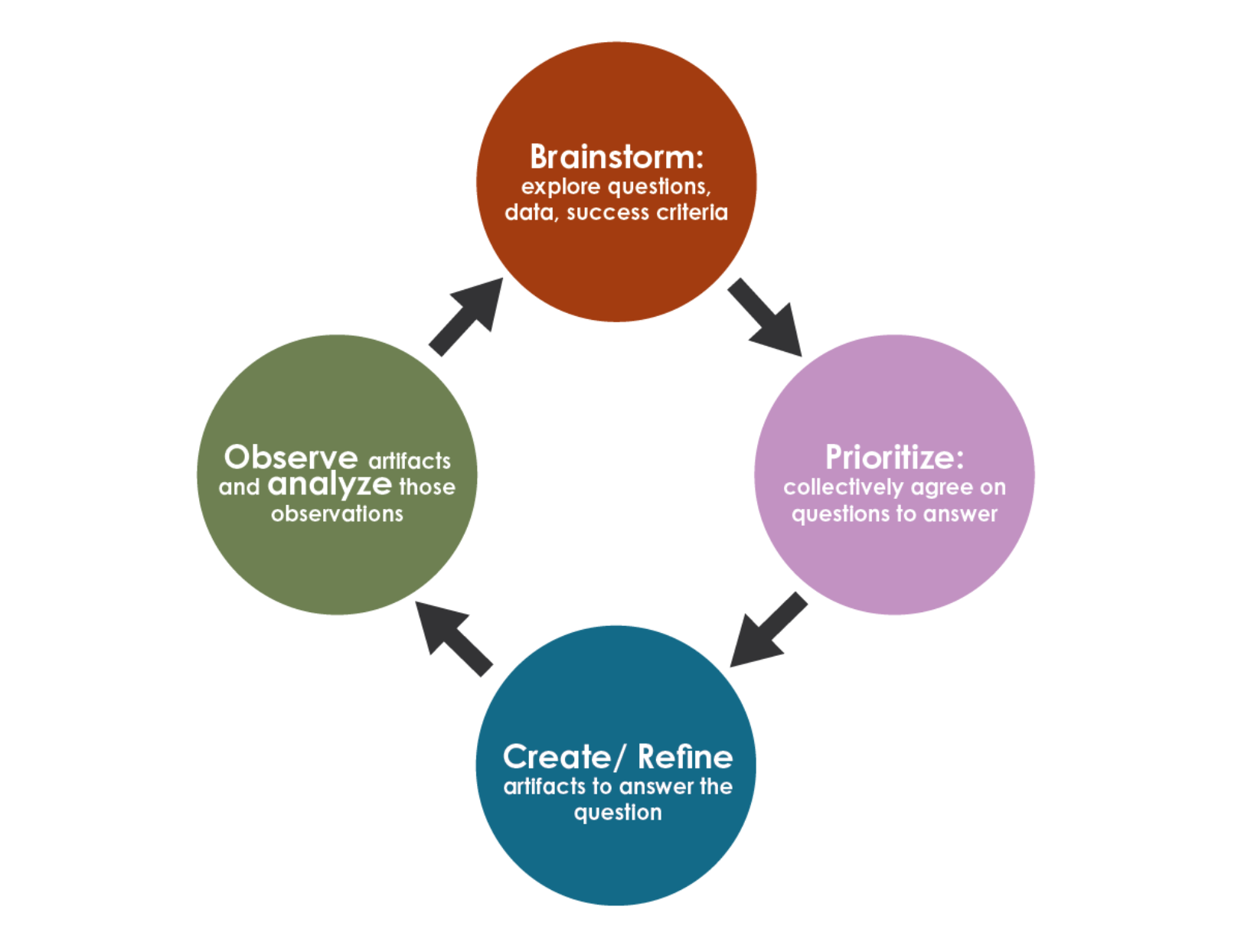
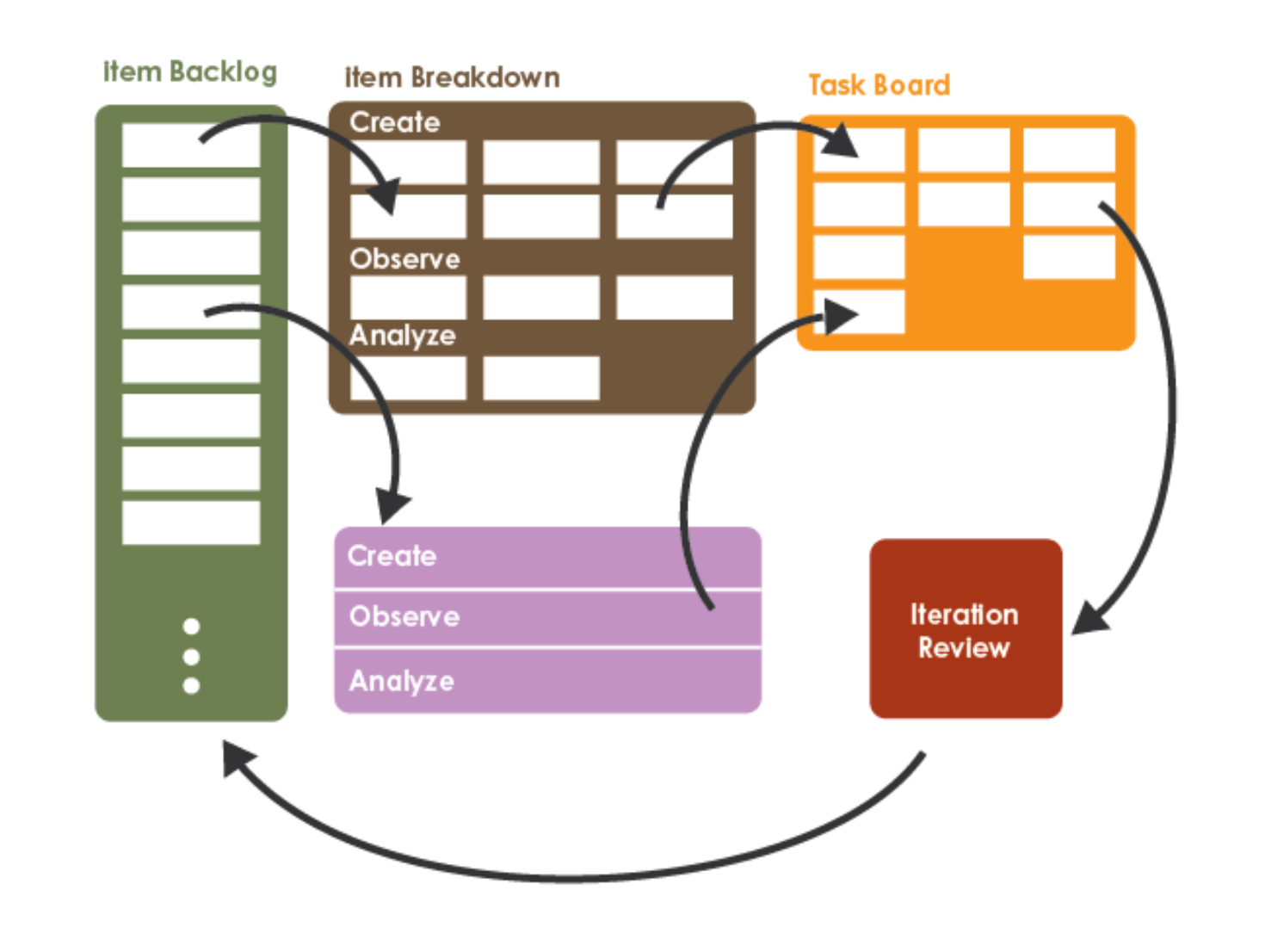
Data-Driven Scrum (DDS) [1, 2]. Capability-based iterations (not time-boxed sprints), a Product Backlog of items, an Item Breakdown Board, a task board, and the rule that every backlog item must include something to Create, something to Observe, and something to Analyze. DS3 is a direct descendant of DDS and keeps these mechanics.
Lean Inception (Caroli) [9]. A one-week structured inception to align a team around vision, users, features, and a sequenced plan. DS3 compresses this to a single class session for the Studio Charter.
Agile Project Liftoff (Larsen and Nies) [10]. Three elements every team should have at the start: purpose, alignment, context. DS3 adopts this trio directly as the spine of the Studio Charter.
The studio model in higher education [11, 12]. Design studio pedagogy has run parallel-project critique-driven cohorts for over a century. DS3 borrows the crit (public review of work-in-progress) and the desk crit (focused one-on-one feedback) and translates them into peer stakeholder review.
What is novel in DS3?
Six elements distinguish DS3 from DDS and from generic agile.
| Component | What it adds beyond DDS |
|---|---|
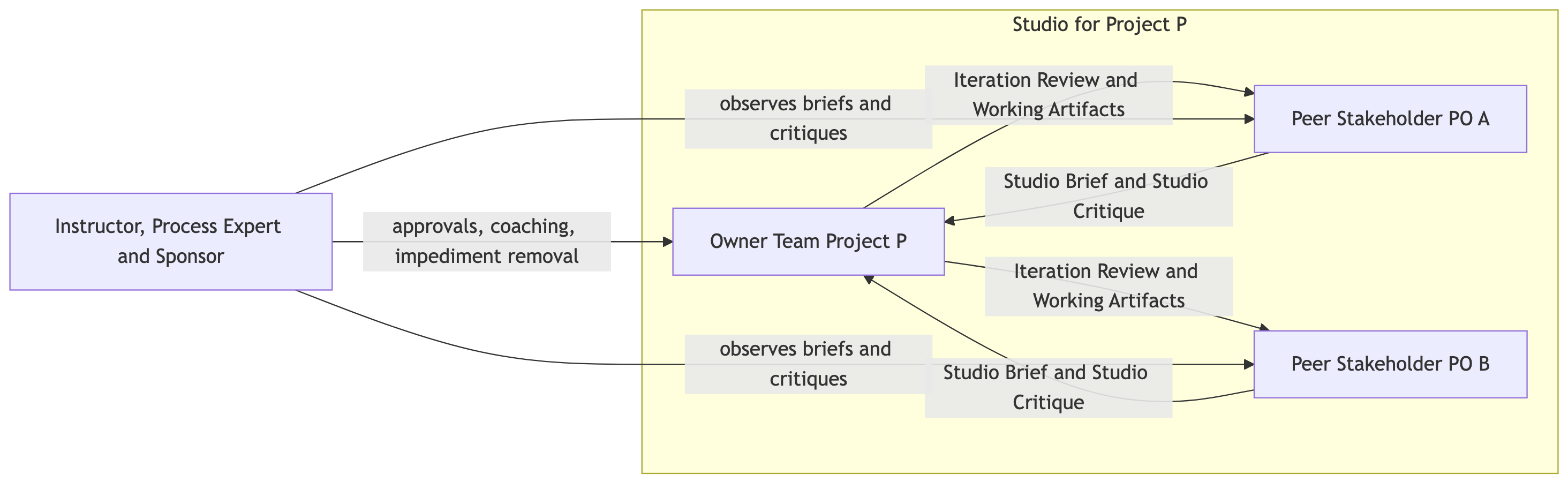
| Triadic Distributed Product Ownership (T-DPO) | Three voices in the product-owner triad per project: the owner team itself, plus two or three peer stakeholder PO individuals drawn from domain-matched capstone teammates. I sit above the triad as approver and process expert. |
| Studio Brief / Studio Critique (SB-SC) | A weekly two-step loop: peer POs deliver a Studio Brief (requirement injection) for next week, and a Studio Critique on last week’s delivered work. The brief and critique are written artifacts, not just conversations. |
| Academic Cadence Overlay (ACO) | A mapping that preserves DDS’s capability-based iterations inside a fixed weekly class cadence. Iterations may finish at different times, but reviews, briefs, critiques, and standups all land on the class meeting. |
| Dual-Role Studio Membership (DRSM) | Every student plays two roles in parallel: Owner on their own project, Stakeholder PO on two adjacent projects (one in each of the two Studio Sessions other than their own). The framework explicitly schedules and rewards this dual workload. |
| Milestone-Tagged Backlog (MTB) | Every backlog item carries a tag pointing at the graded milestone it serves (proposal, data summary, poster rough draft, write-up rough draft, final). Prevents process from drifting away from grade-bearing artifacts. |
| Studio Charter (single-session inception) | A compressed adaptation of Lean Inception and Liftoff that fits one class block and produces a committed CHARTER.md plus a seeded backlog. |
Roles
DS3 keeps DDS’s three-role spine (Product Owner, Process Expert, Team Member) and splits Product Owner into a triad. Every role below is filled inside one project’s studio (the project, its two or three peer stakeholder PO individuals, and me).
| Role | Filled by | Core responsibilities |
|---|---|---|
| Owner Product Lead | One named student on the project team (solo students are their own lead) | Leads the Studio Session, maintains the backlog and task board, sets internal priority week to week, integrates Studio Briefs into the next iteration plan, presents the weekly Iteration Review |
| Owner Team (DDS Team) | All members of the project (1 to 3) | Cross-functional execution across engineering, modeling, visualization, ethics, and writing; performs Create / Observe / Analyze on each pulled backlog item |
| Peer Stakeholder Product Owner (two or three per project) | The assigned peer PO individuals from the meta-project cluster, see Peer Stakeholder PO lookup | Issue a written Studio Brief each week with requirements, questions, and risks; deliver a written Studio Critique the following week on what was actually produced; treat the project as if they were a domain customer |
| Process Expert | Instructor; optionally a rotated student facilitator on larger teams | Coaches DS3 mechanics, remove impediments, enforce academic cadence, and mediate priority conflicts between owner team and peer POs |
| Sponsor | Instructor | Approve data sources and proposal scope, sign off on milestone deliverables, and hold final authority when triad priorities collide |
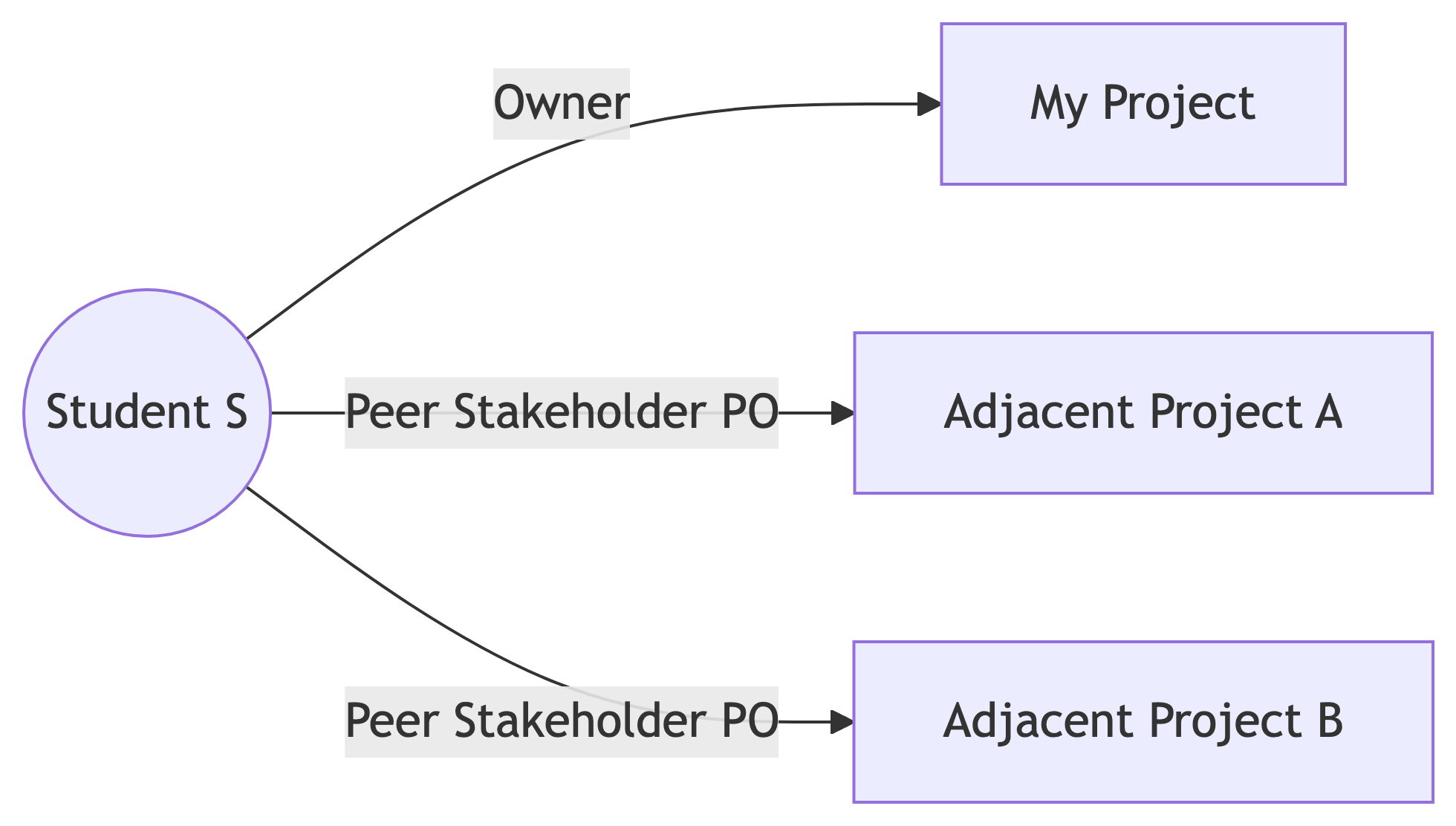
Dual-role rule. Every student is an Owner on exactly one project and a Peer Stakeholder PO on exactly two adjacent projects, one in each of the two Studio Sessions other than their own project’s session. The framework treats this as a feature, not a bug: it is the mechanism by which students experience the receiving end of vague requirements and late deliverables.
Dual-role membership (each student belongs to three studios)
Because each student owns one project and peer-PO-s two, every student lives at the intersection of three studios. Time budgeting matters: see the Studio Session page for the in-class schedule.
Artifacts
DS3 has six artifacts. Four are inherited from DDS; two are new.
| Artifact | Origin | What it is |
|---|---|---|
| Product Backlog | DDS / Scrum | Prioritized list of Product Backlog Items (PBIs). Each PBI names a hypothesis or user story plus a Create, Observe, Analyze triple and a milestone tag (proposal, data summary, poster, write-up). |
| Item Breakdown Board (IBB) | DDS | Decomposition workspace where the top of the backlog is exploded into tasks during refinement. |
| Task Board | DDS / Kanban | Visible flow of in-progress tasks. Suggested columns: Backlog, Create, Observe, Analyze, Done. |
| Iteration Review Report | DDS | Weekly README section that captures what was completed, what was observed, what was analyzed, and what is planned next. |
| Studio Brief (new in DS3) | Lean Inception, Liftoff | One short document per peer PO per week, written before the owner team plans next iteration. Names a requirement, a question, or a risk, with a “why this matters” sentence. |
| Studio Critique (new in DS3) | Studio model, DDS Iteration Review | One short document per peer PO per week, written after the owner team posts last iteration’s results. Assesses what was delivered against the charter and against the prior brief. |
DDS flow of work
DDS core artifacts
The Studio Brief / Studio Critique loop (new)

Task board columns

The five columns are phases of work happening on a single PBI, not work types. Each PBI sits in Create, then Observe, then Analyze as the team works through its Create / Observe / Analyze triple, and only crosses into Done when it passes the Definition of Done. The full lifecycle, the WIP cap, and what triggers each column move are described under Operational tooling > Iterative Development board.
Operational tooling
DS3 lives in two operational tools: a per-project GitHub repo with a Projects board, and a per-project Discord category inside the class server. I provision the Discord categories; the owner team provisions the repo and board.
GitHub repo per project
Each owner team creates and owns a GitHub repo. The repo is the canonical home for the Charter, the backlog, the studio artifacts, and the working code. You do not have to scaffold it from scratch: I maintain a template repo with the full DS3 layout, naming conventions, and a .gitignore already wired up.
Template repo: https://github.com/LucasCordova/ds3template
By the end of the Studio Charter session in week 3 (see Studio Charter) the Owner Product Lead has:
- Created the project repo from the template. On the template page click Use this template → Create a new repository, give it a descriptive name (e.g.,
data510-<project-slug>), and choose private or public per the team’s preference. - Added me,
LucasCordova, as a collaborator with Admin access. - Added each of your two or three peer POs as collaborators with at least Triage access. They need to comment on issues, comment on PRs, and push Studio Briefs and Studio Critiques as commits or pull requests.
- Filled in the placeholders in the templated
README.mdandCHARTER.md(project name, owner team, peer POs, Studio Session, links).
The template ships with this top-level layout, so once you click Use this template you already have:
README.md          # Iteration Review per week (stubs for W4..W14 included)
CHARTER.md         # Charter template (vision, mission, SLAs, DoR/DoD)
BACKLOG.md         # Mirrors the GitHub Projects board, human readable
studio/
  briefs/          # _TEMPLATE.md + W<NN>-<peer-name>.md per peer PO per week
  critiques/       # _TEMPLATE.md + W<NN>-<peer-name>.md per peer PO per week
src/               # source code, with a README of suggested layout
notebooks/         # exploratory + reporting notebooks
data/              # raw/external/interim .gitignored; processed committable
deliverables/      # M1..M5 milestone artifacts
.gitignore         # Python + data science + Quarto + OS defaults
GitHub Projects board per project (Iterative Development board)
Every project needs a GitHub Projects (v2) board, configured as an Iterative Development board with the five DS3 status columns (Backlog, Create, Observe, Analyze, Done), and explicitly linked to the project’s repo. The board does not appear automatically when you create a repo, and a brand-new GitHub Project is not linked to any repo by default; the owner team has to provision the board, set its Default repository to the project repo, and grant collaborator access. The walkthrough below uses my pre-configured template so you don’t have to wire the columns and fields up by hand.
Once configured, the board is the single visible place where every PBI lives from the moment it is pulled until it is shipped into the next Iteration Review.
Bootstrap your board from my template (one-time setup)
I maintain a pre-configured DS3 project board so you don’t have to wire up the columns and fields by hand. Copy it once at the start of the term:
- Visit my project board template at https://github.com/users/LucasCordova/projects/3.
- Click the three dots (
⋯) in the upper-right corner of the board, then click Make a copy. - In the Make a copy dialog: select yourself as the Owner and name the new project
@Project Board, then create the copy. - Open your new copy of the board and click the gear icon (Project Settings) in the upper-right corner.
- Under Default repository, choose your project repository so the board is linked to it. Without this step, every new issue you create from the board lands in the wrong place.
- Still in Project Settings, open Manage access and add:
- Each of your peer POs by GitHub username (give them at least Read access; Write if your charter allows them to add items directly to the board).
- Me,
LucasCordova, with Admin access.
- Paste the live board URL into your
CHARTER.mdunder GitHub Projects board and pin it in the project’s#generalchannel on Discord.

What each column means as a phase of work
The columns are not work types (“the modeling column”) and not people (“the engineer’s column”). They are phases of work on a single PBI: every PBI carries a Create / Observe / Analyze triple, and the column tells you which third of that triple the team is currently doing.
| Column | The PBI is here when… | What activity is happening | What triggers the next move |
|---|---|---|---|
Backlog |
The PBI exists, is prioritized, and is filtered by milestone tag during planning. It may not yet meet the Definition of Ready. | Refinement: filling in hypothesis, Create / Observe / Analyze triple, milestone tag, size. | The Owner Product Lead confirms it meets the Definition of Ready and the team has WIP slack to pull it. |
Create |
The team is building the artifact named in the PBI: ingestion script, dataset snapshot, model code, draft figure, draft section. | Engineering, modeling, drafting. The deliverable is the Create artifact. | The Create artifact is committed to the repo (or linked in the issue from a notebook, gist, or external source). |
Observe |
The team is running the experiment or measurement specified by the PBI. | Counting, measuring, validating, generating evaluation metrics, sanity-checking outputs. The deliverable is evidence, not interpretation. | The Observe results are recorded somewhere referenceable (notebook output, CSV in data/processed/, a results section in a draft). |
Analyze |
The team is interpreting the Observe results against the PBI’s hypothesis. | Reading, writing up the decision, naming a next step (continue, pivot, kill, decompose into new PBIs). The deliverable is a decision. | The Analyze writeup is in the next Iteration Review draft (or in a PR), and a peer PO has either signed off or filed a Studio Critique. The PBI passes the Definition of Done. |
Done |
The PBI passes the Definition of Done and has been linked in README.md under Completed PBIs in the next Iteration Review. |
Nothing. Done cards are evidence at the end of the term. | Don’t archive Done cards mid-term; we use them in the milestone retrospectives. |
Why the columns are not “to do / doing / done”
The Create / Observe / Analyze split exists because data science work fails in a specific way: teams create something (a model, a query, a chart) and then declare victory before they have observed whether it actually answers the question, and long before they have analyzed what the observation means. Splitting the in-flight portion of the board into three named phases makes it impossible to skip steps without it being visible to the peer POs and to me.
WIP and ownership
- WIP limit: the total number of PBIs in
Create+Observe+Analyzeat any time should be at most one more than the number of owners on the team (so a 1-person team caps at 2 in flight, a 2-person team at 3, a 3-person team at 4). When you hit the cap, finish work in flight before pulling fromBacklog. - Who moves cards: the Owner team moves cards forward as they finish each phase. The Owner Product Lead is responsible for board hygiene: no orphan cards, every card has a milestone tag and a size, and the column you are in matches the work you are actually doing.
- What peer POs do on the board: peer POs comment on issues and drop suggestions in Studio Briefs that may turn into new PBIs. Peer POs do not move owner cards across columns; that is the owner team’s call.
- What I do on the board: during the Instructor sync slot in each Studio Session I open the board, walk it column by column, and call out anything that is in the wrong column or stuck.
Capability-based, not time-boxed
A PBI can sit in Observe for two weeks if the experiment legitimately takes that long. The board does not reset at the end of the week. The class meeting and the Iteration Review still happen on the academic calendar regardless of where each project’s PBIs are on the board, which is the Academic Cadence Overlay at work.
How the board feeds the Iteration Review
Every PBI that crossed into Done since the last Iteration Review becomes a bullet under Completed PBIs in this week’s README.md Iteration Review, in this format:
- PBI-### <title> -- Create: <link>, Observe: <result>, Analyze: <decision>PBIs that crossed into Create, Observe, or Analyze but did not finish go under In-flight (carrying across the boundary). This is the bridge between the live board (a snapshot of “right now”) and the README log (the durable weekly history that peer POs read before filing the next Brief and Critique).
Every PBI is a GitHub issue in the repo, added to the board, tagged with its milestone (M1-proposal, M2-data-summary, M3-poster-draft, M4-writeup-draft, M5-final, infra, ethics), and sized (S / M / L / XL). The full Definition of Ready and Definition of Done are spelled out in the Studio Charter.
Discord per project
I run a class Discord server: https://discord.gg/RjkTUqzuch. After joining, the welcome screen has buttons that let you opt into channel categories. Click the buttons for your own project’s category and for each of your two peer projects’ categories. That gives you visibility into every studio where you have a role (owner or peer PO) and hides the rest.
There will be one category per project with the following channels:
| Channel | Purpose |
|---|---|
#general |
Day-to-day project discussion: planning, decisions, links, async Q&A between owner team and peer POs. Pin the GitHub repo URL and Projects board URL here. |
#standup |
Async written standups posted before each class (yesterday / today / blockers), one post per owner. Solo owners post their self-standup here. |
#studio |
Peer POs drop links to their Studio Brief and Studio Critique here as soon as they commit them to the repo. Threaded discussion lives in the channel. |
#blockers |
Owner team flags impediments and data approval requests to me. I respond here or in the next Studio Session, whichever is faster. |
Iteration mechanics
DS3 preserves DDS’s two crucial mechanics:
- Iterations are capability-based, not time-boxed. An iteration ends when its create / observe / analyze cycle is complete, whether that takes two days or two weeks.
- Meetings are time-based, not iteration-based. Standups, reviews, briefs, critiques, and retrospectives all happen on the class calendar, regardless of where each project’s current iteration is.
This decoupling is what lets data science work breathe (some experiments are fast, some are slow) while still leading to a predictable weekly ritual.
Milestone-Tagged Backlog
Every PBI is tagged with the graded milestone it serves. This is the second protection against process drifting away from grades. Milestone tags:
M1-proposal(due end of week 4)M2-data-summary(week 7)M3-poster-draft(week 10)M4-writeup-draft(week 12)M5-final(week 14)infra(engineering work that serves multiple milestones)ethics(consent, fairness, retention, governance work)
Items with no milestone tag are a smell. I flag them during weekly refinement.
DS3 vs DDS at a glance
| Dimension | DDS (industry) [1, 2] | DS3 (academic) |
|---|---|---|
| Product owner | Single empowered PO | Triad: Owner Product Lead + two or three Peer Stakeholder POs |
| Stakeholders | Loosely defined; PO is “voice of the customer” | Two or three named peer PO individuals per project, drawn from the meta-project cluster |
| Iteration timing | Capability-based, variable | Capability-based, variable, but bounded by the academic calendar |
| Meeting cadence | Daily standup; review and retrospective on time-based intervals | Weekly Studio Session in class; written cadence between classes |
| Stakeholder communication | Mostly verbal, via PO | Written: Studio Brief and Studio Critique each week |
| Backlog discipline | PBIs include Create / Observe / Analyze | PBIs include Create / Observe / Analyze + milestone tag |
| Team composition | 3 to 9 cross-functional members | 1 to 3 owners; cross-functional via curriculum, not headcount |
| Scaling | Compatible with Scrum@Scale or SAFe | Scales by adding studios, not by stacking teams; each student plays Owner + 2 PO roles |
| Inception | Not specified | Studio Charter: single-session inception with committed artifacts |
The DS3 semester at a glance

Quick links
References
- Saltz, J. S., Hotz, N., and Sutherland, A. (2022). Achieving Lean Data Science Agility Via Data Driven Scrum. Proceedings of the 55th Hawaii International Conference on System Sciences (HICSS). https://hdl.handle.net/10125/80218
- Data Science Process Alliance. Data Driven Scrum. https://www.datascience-pm.com/data-driven-scrum/
- Schwaber, K., and Sutherland, J. The Scrum Guide. https://scrumguides.org/
- Anderson, D. J., and Carmichael, A. The Kanban Guide. https://kanbanguide.org/
- Womack, J. P., and Jones, D. T. (2003). Lean Thinking: Banish Waste and Create Wealth in Your Corporation. Free Press.
- Poppendieck, M., and Poppendieck, T. (2003). Lean Software Development: An Agile Toolkit. Addison-Wesley.
- Ries, E. (2011). The Lean Startup. Crown Business.
- Chapman, P., Clinton, J., Kerber, R., Khabaza, T., Reinartz, T., Shearer, C., and Wirth, R. (2000). CRISP-DM 1.0: Step-by-step data mining guide. https://www.the-modeling-agency.com/crisp-dm.pdf
- Caroli, P. (2018). Lean Inception: How to Align People and Build the Right Product. Editora Caroli.
- Larsen, D., and Nies, A. (2016). Liftoff: Start and Sustain Successful Agile Teams (2nd ed.). Pragmatic Bookshelf.
- Schon, D. A. (1985). The Design Studio: An Exploration of its Traditions and Potentials. RIBA Publications.
- Shaffer, D. W. (2003). Portrait of the Oxford Design Studio: An Ethnography of Design Pedagogy. WCER Working Paper.